



URL copied to clipboard

Create the file ext_emconf.php
4 views
__readtime__ Min
read
1. Create a folder and name it as the name of your extension key in lowercase.
2. Here the extension key is “employee” so create a folder named “employee”.
3. Now create a file ext_emconf.php into the employee directory.
4. File path: employee/ext_emconf.php
5. Add the following code to the file.
<?php
$EM_CONF[$_EXTKEY] = [
    'title' => 'Employees',
    'description' => 'Employee Details',
    'category' => 'be',
    'author' => 'Author name',
    'author_email' => 'author@company.in',
    'state' => 'stable',
    'version' => '1.0.0',
    'constraints' => [
        'depends' => [
            'typo3' => '12.1.0-12.4.99'
        ],
        'conflicts' => [
        ],
        'suggests' => [
        ],
    ],
];
See the reference link – https://docs.typo3.org/m/typo3/reference-coreapi/main/en-us/ExtensionArchitecture/FileStructure/ExtEmconf.html#file-ext-emconf-php
1. title – The name of the extension in English, and that name will appear in the list of extensions.
2. description – Short and precise description in English of what the extension does and for whom it might be useful.
3. category – Which category does the extension belong to? – here it is “be” (Backend), but it could be anything from the below list.
- be – Backend (Generally backend-oriented, but not a module)
- module – Backend modules (When something is a module or connects with one)
- fe – Frontend (Generally frontend oriented, but not a “true” plugin)
- plugin – Frontend plugins (Plugins inserted as a “Insert Plugin” content element)
- misc -Miscellaneous stuff (Where not easily placed elsewhere)
- services – Contains TYPO3 services
- templates – Contains website templates
- example – Example extension (Which serves as examples etc.)
- doc – Documentation (e.g. tutorials, FAQ, etc.
- distribution – Distribution, an extension kickstarting a full sit
4. author – Author name
5. author_email – Author email address
6. author_company – Author company
7. state- Which state is the extension in; it could be anything from the below options
- alpha – The alpha state is used for very initial work, basically the extension is during the very process of creating its foundation.
- beta – Under current development. Beta extensions are functional, but not complete in functionality.
- stable – Stable extensions are complete, mature, and ready for production environment. Authors of stable extensions carry a responsibility to maintain and improve them.
- experimental – The experimental state is useful for anything experimental – of course. Nobody knows if this is going anywhere yet… Maybe still just an idea.
- test – Test extension, demonstrates concepts, etc.
- obsolete – The extension is obsolete or deprecated. This can be due to other extensions solving the same problem but in a better way or if the extension is not being maintained anymore.
- excludeFromUpdates – This state makes it impossible to update the extension through the Extension Manager (neither by the update mechanism nor by uploading a newer version to the installation). This is very useful if you made local changes to an extension for a specific installation and do not want any administrator to overwrite them.
8. version – Version of the extension. Automatically managed by extension manager / TER. Format is [int].[int].[int]
9. constraints – List of requirements, suggestions, or conflicts with other extensions or TYPO3 or PHP versions.
10. Here’s how a typical setup might look:
EXT:some_extension/ext_emconf.php
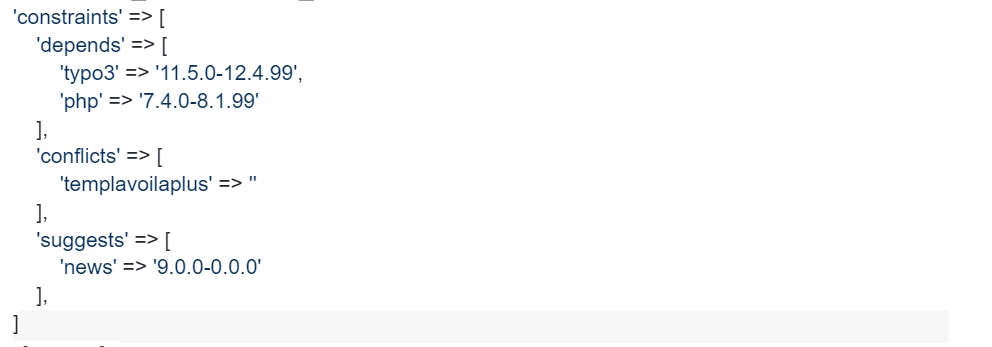
1. depends – List of extensions that this extension depends on. Extensions defined here will be loaded before the current extension.
2. conflicts – List of extensions that will not work with this extension.
3. suggests – List of suggestions of extensions that work together or enhance this extension. Extensions defined here will be loaded before the current extension. Dependencies take precedence over suggestions. Loading order especially matters when overriding TCA or SQL of another extension. The above example indicates that the extension depends on a version of TYPO3 between 11.4 and 12.4 (as only bug and security fixes are integrated into TYPO3 when the last digit of the version changes, it is safe to assume it will be compatible with any upcoming version of the corresponding branch, thus .99). Also the extension has been tested and is known to work properly with PHP 7.4. and 8.1 It will conflict with “templavoila plus” (any version) and it is suggested that it might be worth installing “news” (version at least 9.0.0). Be aware that you should add at least the TYPO3 and PHP version constraints to this file to make sure everything is working properly.
For legacy installations, the ext_emconf.php file is the source of truth for required dependencies and the loading order of active extensions.
Share



