



URL copied to clipboard

Use the list plugin by adding it to the page
3 views
__readtime__ Min
read
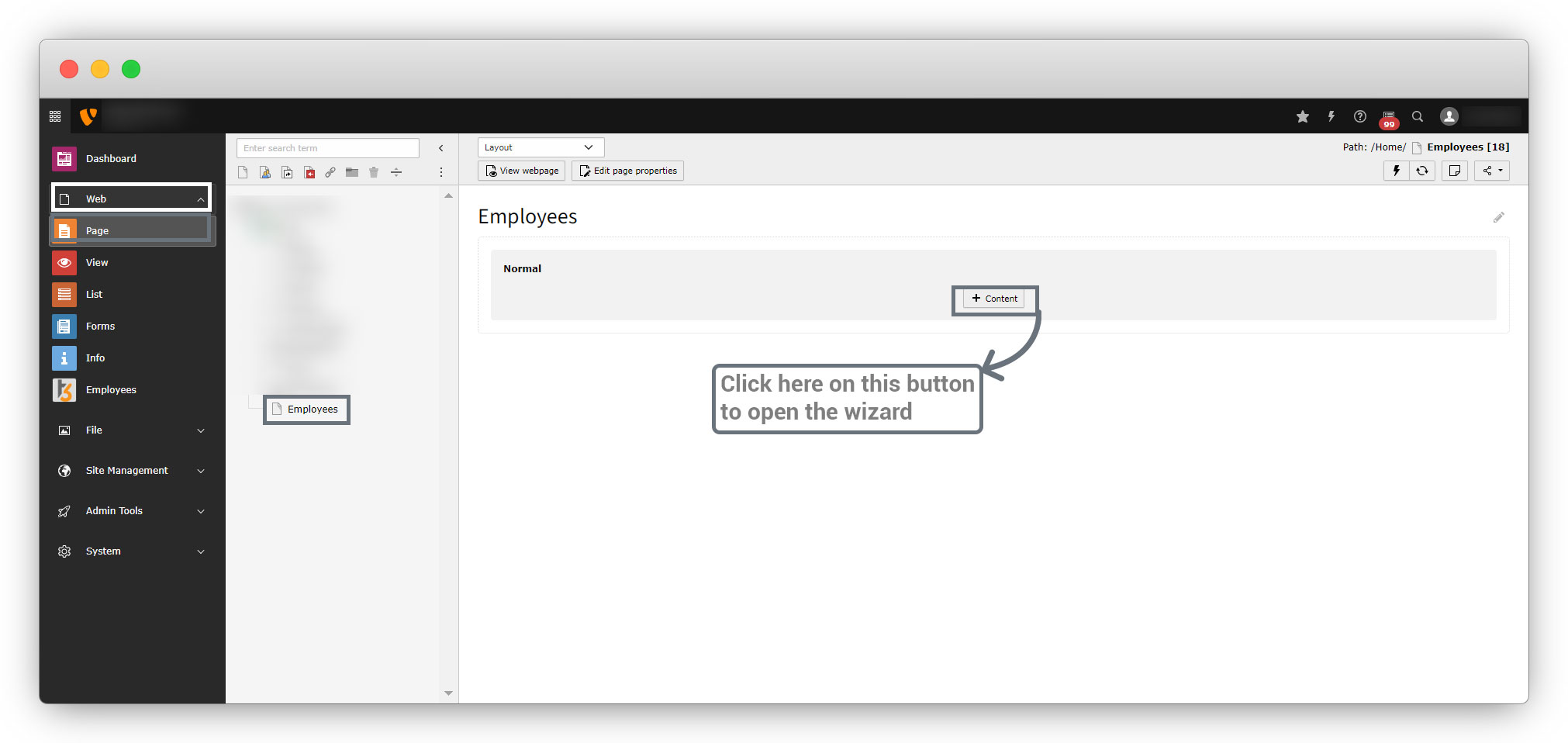
1. Go to Web > Page > Select the page you want to add the plugin to or create a new page if you want to add the plugin to the new page and click on the “+content” button, so the wizard will be open as seen in the screenshot below. Then select the “Plugins” tab and select the extension you want to use, here we want to use the “Employee List” extension we created.
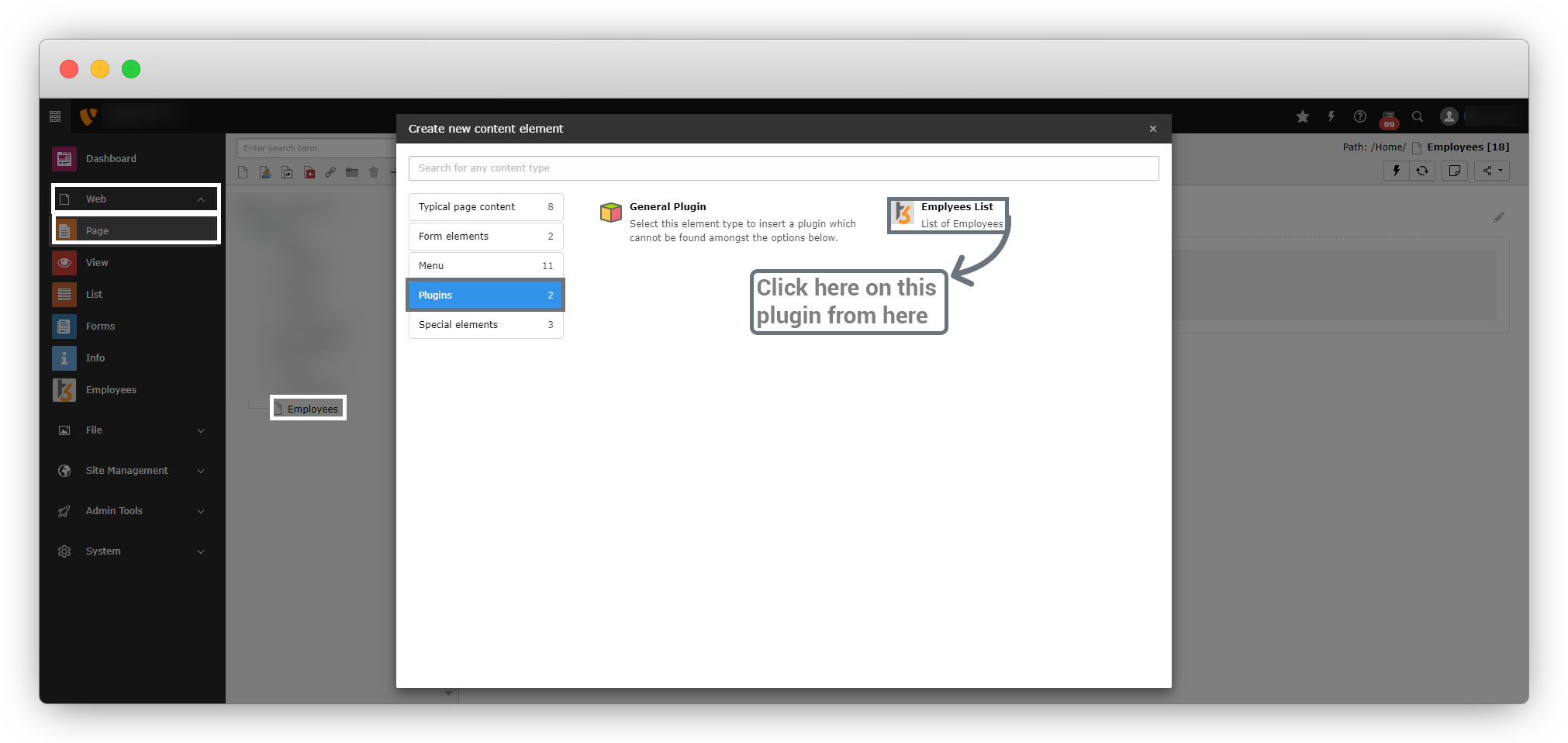
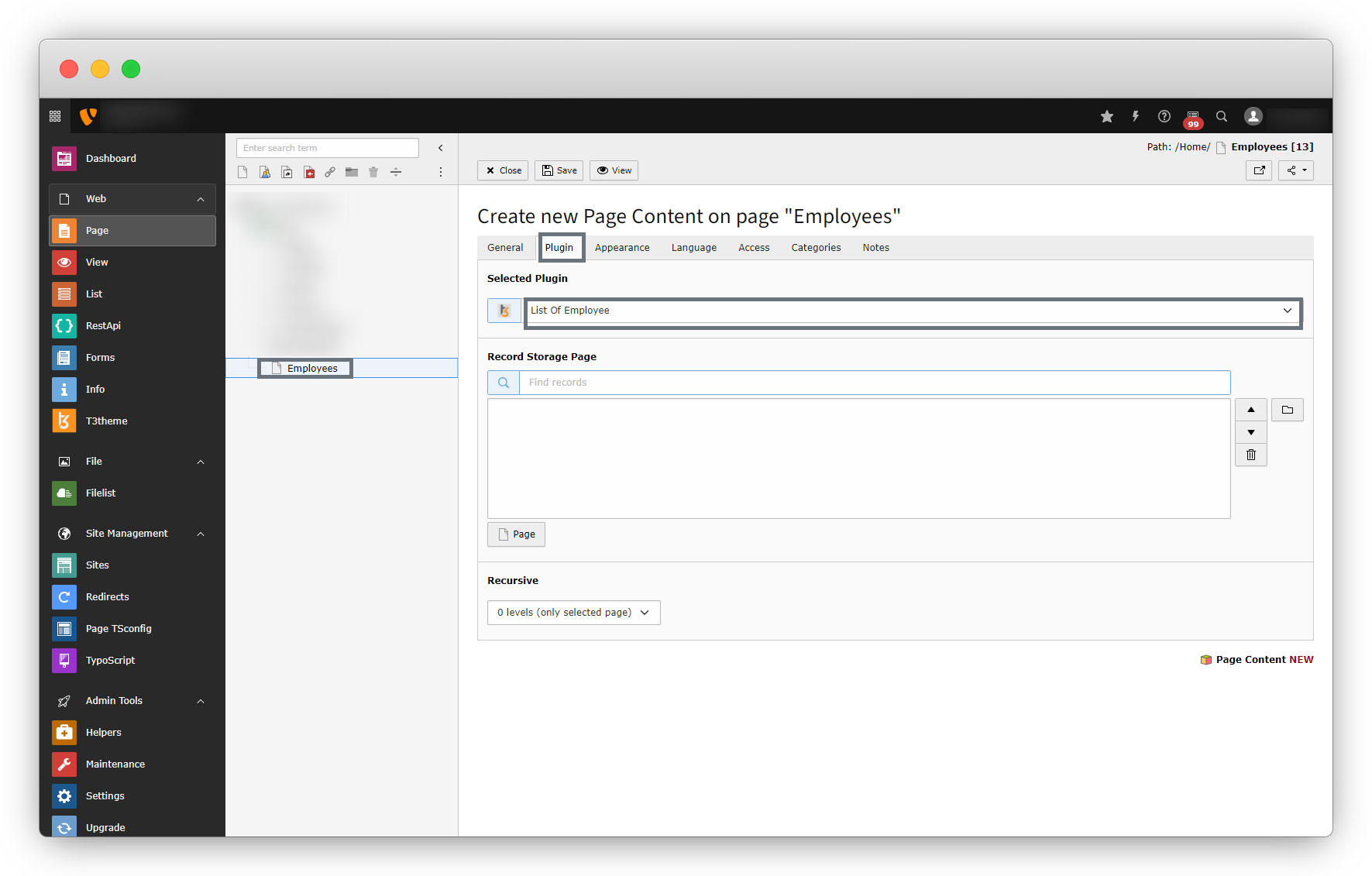
2. Go to the “Plugin” tab as seen in the screenshot below, and select the plugin “List of Employee” from the dropdown.
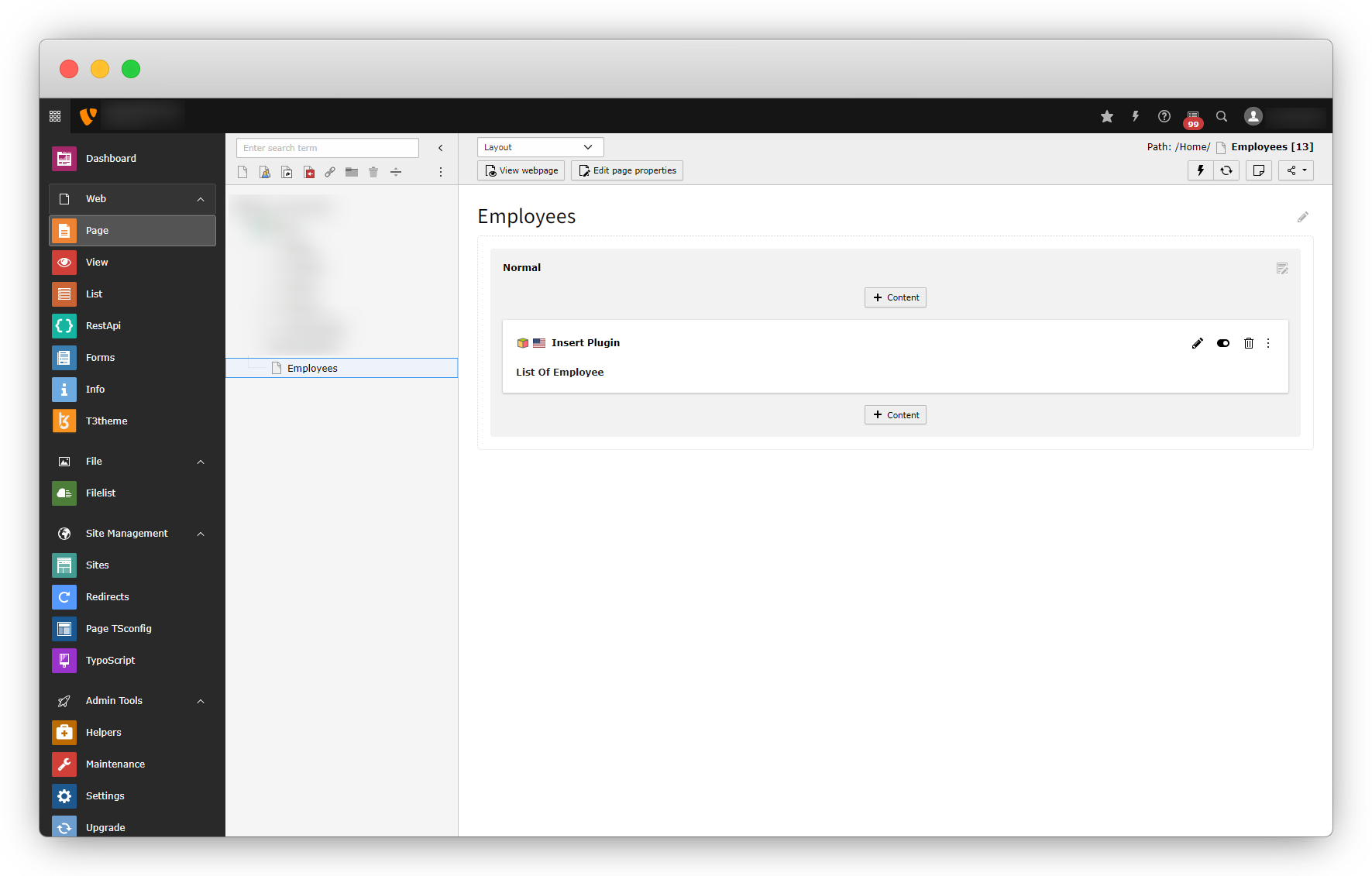
3. Save the page.
4. After saving the page, open the front-end and the below error will be seen.
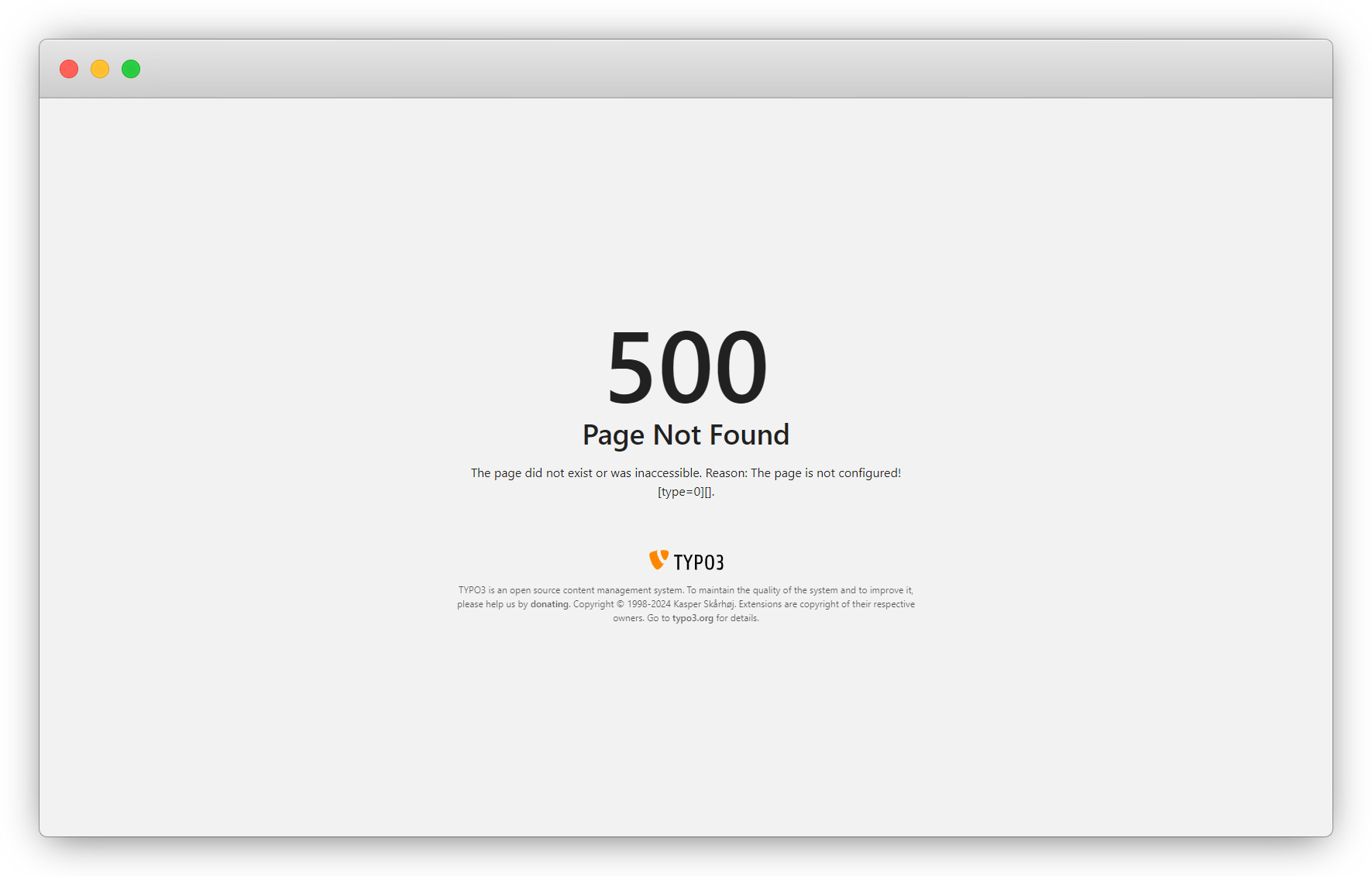
Error: 500 Page Not found
1. This error is occurring because the typoscript is still pending.
2. Typoscript files are located in <extension_directory>/Configuration/TypoScript. Here it will be employee/Configuration/TypoScript.
3. Typoscript files contain .typoscript extension
4. Let’s write the employee/Configuration/TypoScript/setup.typoscript file to render the page in the front-end.
config.contentObjectExceptionHandler = 0
# DEfine page config
page = PAGE
page {
    10 = FLUIDTEMPLATE
    10 {
        templateName = TEXT
        templateName {
            cObject = TEXT
            cObject {
                data = pagelayout
                required = 1
                case = uppercamelcase
                split {
                    token = pagets__
                    cObjNum = 1
                    1.current = 1
                }
            }
            ifEmpty = Default
        }
        templateRootPaths {
            0 = EXT:employee/Resources/Private/Templates/Page/
            1 = {$page.fluidtemplate.templateRootPath}
        }
        partialRootPaths {
            0 = EXT:employee/Resources/Private/Partials/Page/
            1 = {$page.fluidtemplate.partialRootPath}
        }
        layoutRootPaths {
            0 = EXT:employee/Resources/Private/Layouts/Page/
            1 = {$page.fluidtemplate.layoutRootPath}
        }
        dataProcessing {
            10 = TYPO3CMSFrontendDataProcessingFilesProcessor
            10 {
                references.fieldName = media
            }
        }
    }
}
lib.dynamicContent = COA
lib.dynamicContent {
    5 = LOAD_REGISTER
    5 {
        colPos.cObject = TEXT
        colPos.cObject {
            field = colPos
            ifEmpty.cObject = TEXT
            ifEmpty.cObject {
                value.current = 1
                ifEmpty = 0
            }
        }
        pageUid.cObject = TEXT
        pageUid.cObject {
            field = pageUid
            ifEmpty.data = TSFE:id
        }
        contentFromPid.cObject = TEXT
        contentFromPid.cObject {
            data = DB:pages:{register:pageUid}:content_from_pid
            data.insertData = 1
        }
        wrap.cObject = TEXT
        wrap.cObject {
            field = wrap
        }
    }
    20 = CONTENT
    20 {
        table = tt_content
        select {
            includeRecordsWithoutDefaultTranslation = 1
            orderBy = sorting
            where = {#colPos}={register:colPos}
            where.insertData = 1
            pidInList.data = register:pageUid
            pidInList.override.data = register:contentFromPid
        }
        stdWrap {
            dataWrap = {register:wrap}
            required = 1
        }
    }
    90 = RESTORE_REGISTER
}
save the file and now call the file to load this typoscript.
There are 2 ways to add the typoscript in your extension. (Ref. link: https://docs.typo3.org/m/typo3/reference-typoscript/12.4/en-us/UsingSetting/AddTypoScriptWithExtensions.html)
- Make TypoScript available for static includes
- If you include the TypoScript this way, it will not be automatically loaded. You must load it by adding the static include in the Web > Template module in the backend, see Include TypoScript from extensions.
- This has the advantage of better configurability.
- This will load your constants and your setup once the template is included statically.
- Make TypoScript available (always load)
- Only do this, if your TypoScript must really be always loaded in your site.
- If this is not the case, use the method described in the previous section Make TypoScript available for static includes.
Here in this example, the typoscript has been added with the first way “Make TypoScript available for static includes“
1. To add the typoscript this way, call the typoscript file in sys_template.php file
2. Path: <extension_directory>/Configuration/TCA/Overrides/sys_template.php. Here it will be employee/Configuration/TCA/Overrides/sys_template.php
<?php
defined('TYPO3') or die();
call_user_func(function () {
    TYPO3CMSCoreUtilityExtensionManagementUtility::addStaticFile(
        // extension key
        'employee',
        // configuration/typoscript to load the typoscript
        'Configuration/TypoScript',
        // description of the typoscript
        'Employee'
    );
});
3. Static file function has 3 parameters which are i) extension key ii) configuration/typoscript to load the typoscript and iii) description of typoscript.
4. After creating this file, save the file, flush the caches, then go to Site Management > TypoScript > select root page > Edit TypoScript Record and click on Edit the whole TypoScript record button.
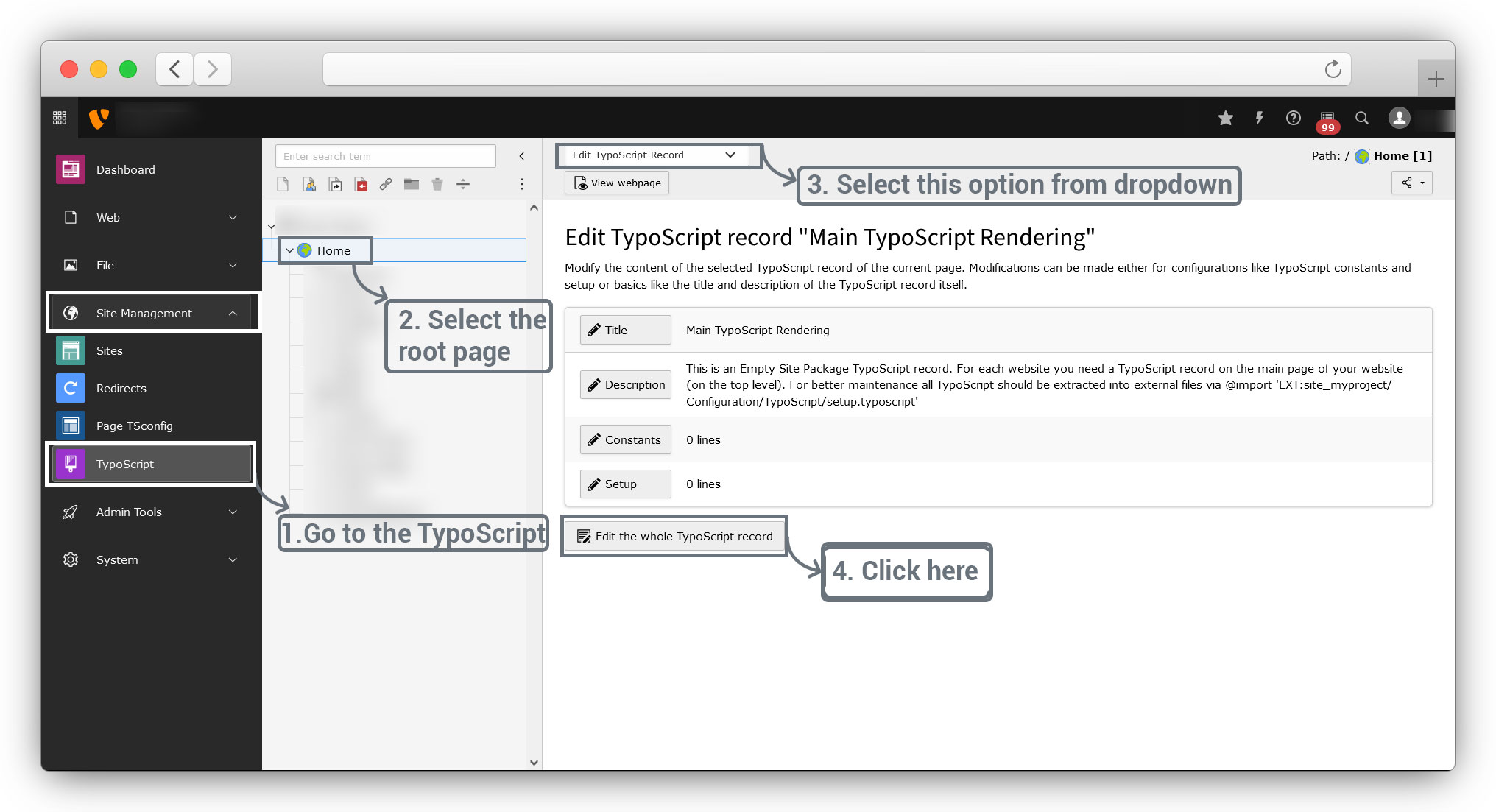
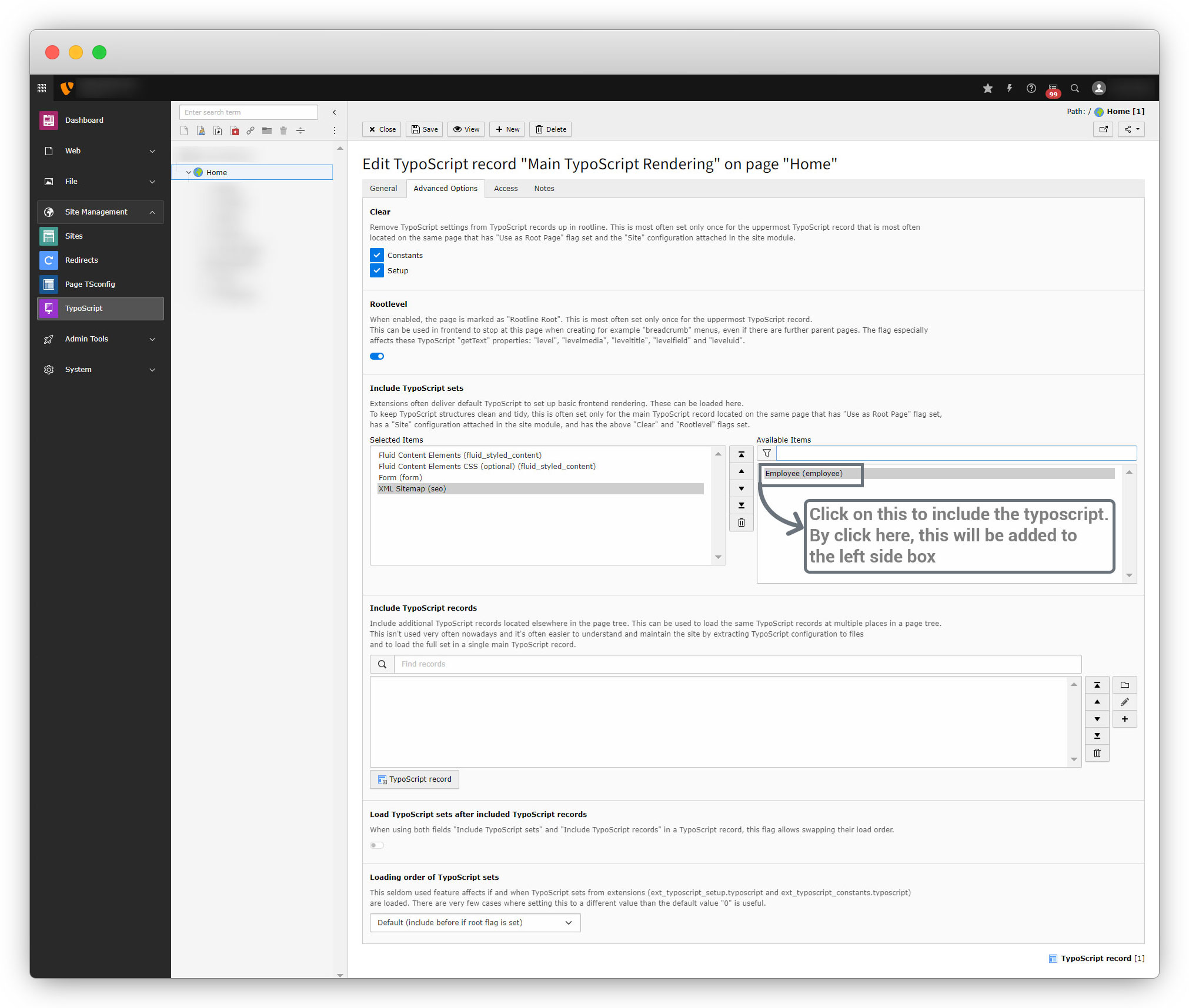
5. Then go to the Advanced Options Tab > Include TypoScript sets > and see your extension typoscripts on “Available Items”. Now click on that typoscript to include the typoscript of that extension, and that will be included by moving to the “Selected Items”.
6. Now flush the cache and open the front-end, and you will be redirected to the screen as seen in the screenshot below.
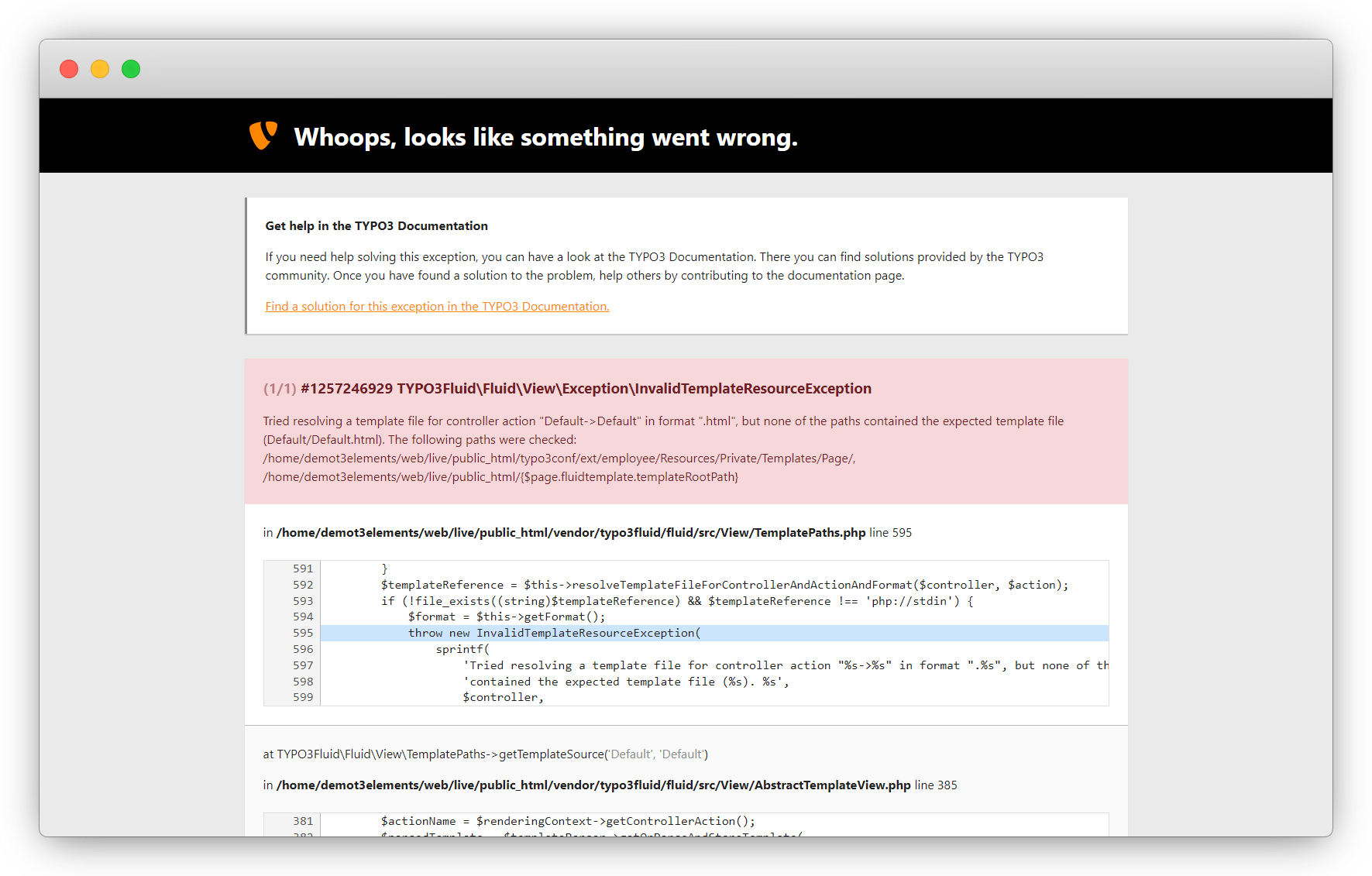
Error: InvalidTemplateResourceException
The layout and template file are not added in the extension as per the typoscript page setup, and that is the reason for the error InvalidTemplateResourceException occurring. Follow the below steps to resolve the error.
1. Let’s add the layout file.
- The file path is <extension_directory>ResourcesPrivateLayoutsPageDefault.html. Here in this example, it would be employeeResourcesPrivateLayoutsPageDefault.html
- Write the line of code below and save the file.
<f:render section="Main" />
2. Let’s add the template file.
- The file path is <extension_directory>ResourcesPrivateTemplatesPageDefault.html. Here in this example, it would be employeeResourcesPrivateTemplatesPageDefault.html
<f:layout name="Default" />
<f:section name="Main">
  <f:cObject typoscriptObjectPath="lib.dynamicContent" data="{colPos: 0}" />
</f:section>
Save the file, flush the cache, and load the front-end page, and you will see the below screen with an error of non-existent service.
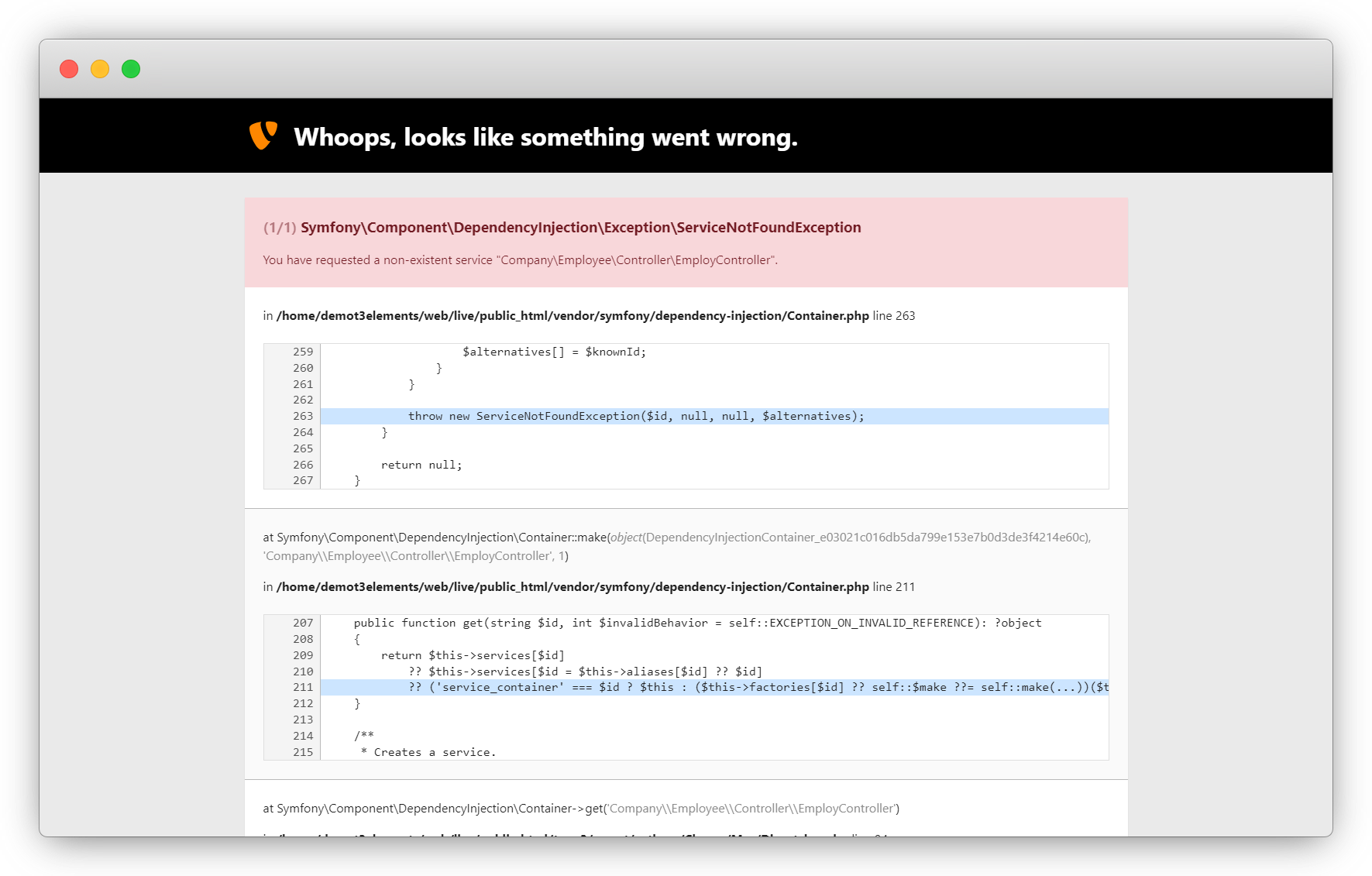
Error: non-existent service
To resolve the error of non-existent service that is occurring in the above screenshot, follow the below steps:
1. Let’s define the service in Services.yaml file.
2. The file path is <extension_directory>/Configuration/Services.yaml, here in this example it would be employee/Configuration/Services.yaml
services:
  _defaults:
    autowire: true
    autoconfigure: true
    public: false

  CompanyEmployee:
    resource: '../Classes/*'
    exclude: '../Classes/Domain/Model/*'
3. Line 7 in the above code (CompanyEmployee) – add <vendor><extension key>.
4. Line 8 in the above code (resources) – allows the classes folder to be added as a service.
5. Line 9 in the above code (exclude) – exclude the model folder from the service.
6. Save the file, toggle the extension (deactivate the extension and then activate it again), or go to Maintainance > Flush TYPO3 and PHP cache and click on the button “Flush cache”, flush the cache, and check the front-end page.
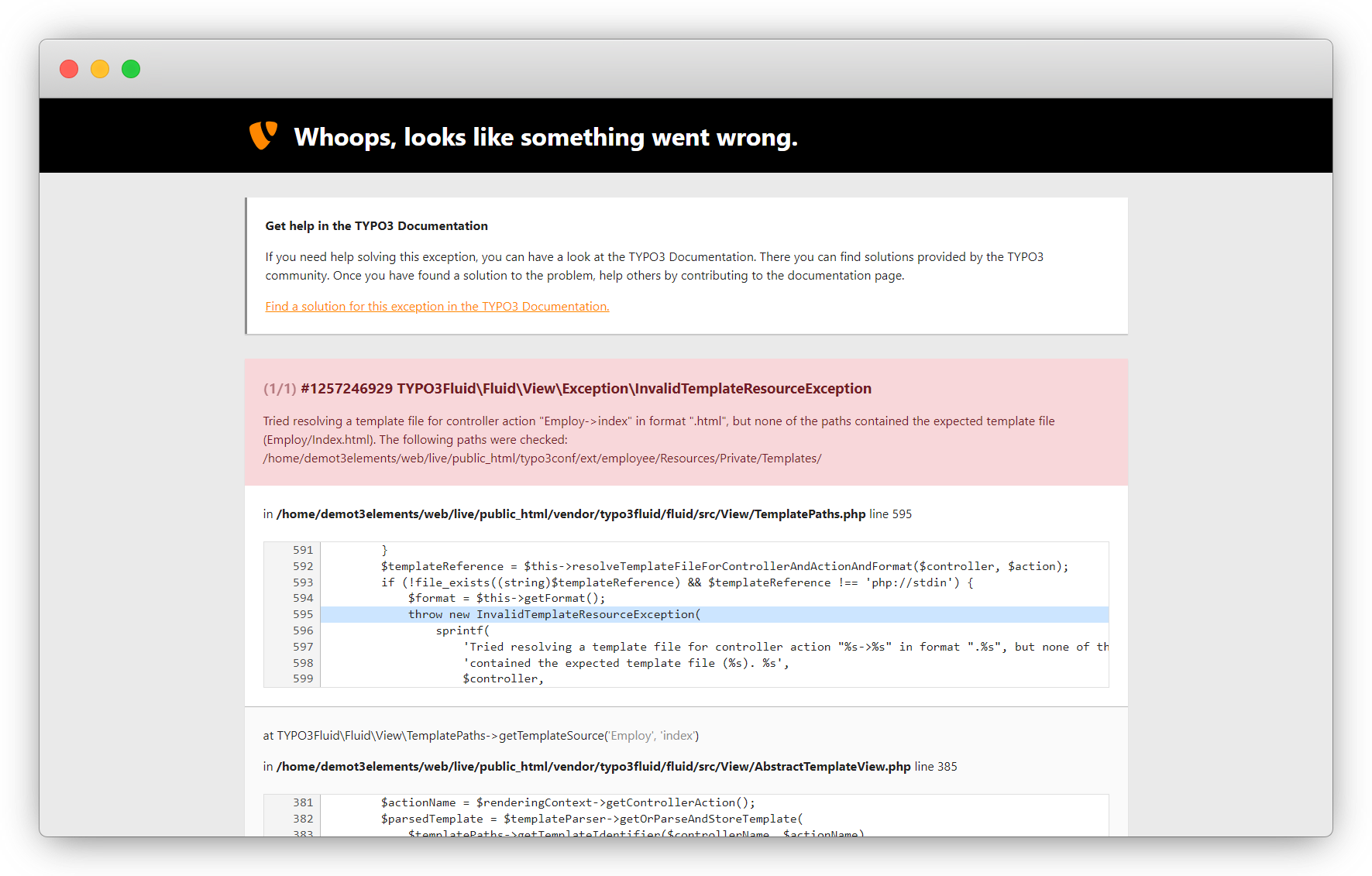
Error: Controller Action file not found
1. The controller action template has not been created yet in the resource > private > templates folder and that is the reason the above error is occurring.
2. Create the template file on path: <extension_directory>/Resources/Private/Templates/<controller_name>/<action_name>.html, here in this example the path is employee/Resources/Private/Templates/Employ/index.html
<div>
    <div>
        <div>
            <h1>List Of Employee</h1>
        </div>
    </div>
</div>
3. Add the above code and save the file and refresh the front-end page and you will see the HTML is rendering, if still, you can’t see the updates then please flush the cache.
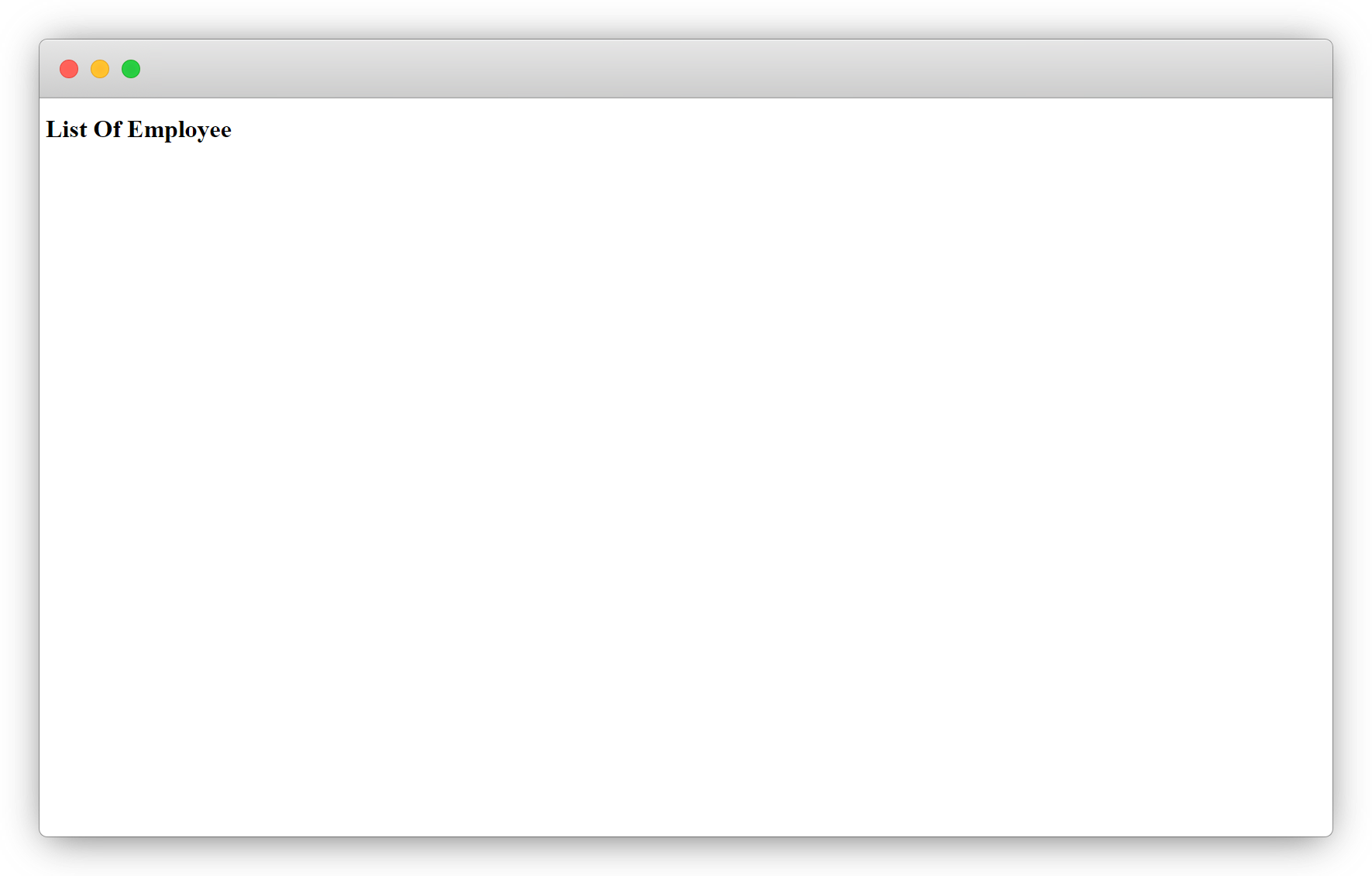
Hurray!! Now the page does render with the added plugin.
Still, the employee list does not render, because the query has not been written and the templating is also not implemented. Now let’s do it to render the record on the page.
Fetch records & render them on the front-end
1. To fetch the records that have been added to the TYPO3 admin panel, need to write the TYPO3 extbase query, and that needs models & repositories which have not been created yet.
2. Let’s create a model and repository first.
Models
1. All classes of the domain model should inherit from the class TYPO3CMSExtbaseDomainObjectAbstractEntity.
2. Objects stored in the database are usually entities as they can be identified by the uid and are persisted, therefore having continuity.
3. It is possible to define models that are not persisted in the database. However, in the most common use cases, you want to save your model to the database and load it from there.
4. A public getter takes precedence over a public property. Getters have the advantage that you can make the properties themselves protected and decide which ones should be mutable.
5. For more details, you can check this ref.link – Ref. link: https://docs.typo3.org/m/typo3/reference-coreapi/12.4/en-us/ExtensionArchitecture/Extbase/Reference/Domain/Model.html
For each table, there will be one model file. Here in this example, 2 models will be created as 2 tables are created for the employee extension.
Then file path will be : <extension_directory>/Classes/Domain/Model/<table>.php
Below is the model file for the table of employ, file path is: employeeClassesDomainModelEmploy.php
<?php
declare(strict_types=1);
namespace CompanyEmployeeDomainModel;
use DateTime;
use TYPO3CMSExtbaseDomainObjectAbstractEntity;
use TYPO3CMSExtbaseAnnotationORMLazy;
use TYPO3CMSExtbaseDomainModelFileReference;
use TYPO3CMSExtbasePersistenceGenericLazyLoadingProxy;
use TYPO3CMSExtbasePersistenceObjectStorage;
use CompanyEmployeeDomainModelEducation;
/**
 * Employ Model
 */
class Employ extends AbstractEntity
{
    /**
     * firstName
     *
     * @var string
     */
    protected $firstName = '';
    /**
     * lastName
     *
     * @var string
     */
    protected $lastName = '';
    /**
     * gender
     *
     * @var string
     */
    protected $gender = '';
    /**
     * birthDate
     *
     * @var DateTime
     */
    protected $birthDate;
    /**
     * joiningDate
     *
     * @var DateTime
     */
    public $joiningDate;
    /**
     * @Lazy
     * @var TYPO3CMSExtbasePersistenceObjectStorage<TYPO3CMSExtbaseDomainModelFileReference>
     */
    protected ObjectStorage $image;
    /**
     * bio
     *
     * @var string
     */
    protected $bio = '';
    /**
     * experiance
     *
     * @var string
     */
    protected $experiance = '';
    /**
     * salary
     *
     * @var string
     */
    protected $salary = '';
    /**
     * integer
     *
     * @var integer
     */
    protected $languages = '';
    /**
     * country
     *
     * @var string
     */
    protected $country = '';
    /**
     * @Lazy
     * @var ObjectStorage<Education>
     */
    protected $educations;
    public function __construct()
    {
        $this->initializeObject();
    }
    public function initializeObject(): void
    {
        $this->educations = $this->educations ?? new ObjectStorage();
        $this->image = $this->image ?? new ObjectStorage();
    }
    /**
     * Returns the firstName
     *
     * @return string
     */
    public function getFirstName(): string
    {
        return $this->firstName;
    }
    /**
     * Sets the firstName
     *
     * @param string $firstName
     * @return void
     */
    public function setFirstName(string $firstName): void
    {
        $this->firstName = $firstName;
    }
    /**
     * Returns the lastName
     *
     * @return string
     */
    public function getLastName(): string
    {
        return $this->lastName;
    }
    /**
     * Sets the lastName
     *
     * @param string $lastName
     * @return void
     */
    public function setLastName(string $lastName): void
    {
        $this->lastName = $lastName;
    }
    /**
     * Returns the gender
     *
     * @return string
     */
    public function getGender(): string
    {
        return $this->gender;
    }
    /**
     * Sets the gender
     *
     * @param string $gender
     * @return void
     */
    public function setGender(string $gender): void
    {
        $this->gender = $gender;
    }
    /**
     * Get birthDate
     *
     * @return DateTime|null
     */
    public function getBirthDate(): ?DateTime
    {
        return $this->birthDate;
    }
    /**
     * Set birthDate
     *
     * @param DateTime $birthDate
     */
    public function setBirthDate(DateTime $birthDate): void
    {
        $this->birthDate = $birthDate;
    }
    /**
     * Get year of birthDate
     *
     * @return int
     */
    public function getYearOfBirthDate(): int
    {
        if ($this->getBirthDate()) {
            return (int) $this->getBirthDate()->format('Y');
        }
        return 0;
    }
    /**
     * Get month of birthDate
     *
     * @return int
     */
    public function getMonthOfBirthDate(): int
    {
        if ($this->getBirthDate()) {
            return (int) $this->getBirthDate()->format('m');
        }
        return 0;
    }
    /**
     * Get day of birthDate
     *
     * @return int
     */
    public function getDayOfBirthDate(): int
    {
        if ($this->birthDate) {
            return (int) $this->birthDate->format('d');
        }
        return 0;
    }
    /**
     * Set joiningDate
     *
     * @param DateTime $joiningDate
     */
    public function setJoiningDate(DateTime $joiningDate): void
    {
        $this->joiningDate = $joiningDate;
    }
    /**
     * Get year of joiningDate
     *
     * @return int
     */
    public function getYearOfJoiningDate(): int
    {
        if ($this->getJoiningDate()) {
            return (int) $this->getJoiningDate()->format('Y');
        }
        return 0;
    }
    /**
     * Get month of joiningDate
     *
     * @return int
     */
    public function getMonthOfJoiningDate(): int
    {
        if ($this->getJoiningDate()) {
            return (int) $this->getJoiningDate()->format('m');
        }
        return 0;
    }
    /**
     * Get day of joiningDate
     *
     * @return int
     */
    public function getDayOfJoiningDate(): int
    {
        if ($this->joiningDate) {
            return (int) $this->joiningDate->format('d');
        }
        return 0;
    }
    /**
     * @return TYPO3CMSExtbasePersistenceObjectStorage<TYPO3CMSExtbaseDomainModelFileReference>
     */
    public function getImage(): ObjectStorage
    {
        return $this->image;
    }
    /**
     * @param TYPO3CMSExtbasePersistenceObjectStorage<TYPO3CMSExtbaseDomainModelFileReference> $image
     */
    public function setImage(ObjectStorage $image): self
    {
        $this->image = $image;
        return $this;
    }
    /**
     * Returns the bio
     *
     * @return string
     */
    public function getBio(): string
    {
        return $this->bio;
    }
    /**
     * Sets the bio
     *
     * @param string $bio
     * @return void
     */
    public function setBio(string $bio): void
    {
        $this->bio = $bio;
    }
    /**
     * Returns the experiance
     *
     * @return string
     */
    public function getExperiance(): string
    {
        return $this->experiance;
    }
    /**
     * Sets the experiance
     *
     * @param string $experiance
     * @return void
     */
    public function setExperiance(string $experiance): void
    {
        $this->experiance = $experiance;
    }
    /**
     * Returns the salary
     *
     * @return string
     */
    public function getSalary(): string
    {
        return $this->salary;
    }
    /**
     * Sets the salary
     *
     * @param string $salary
     * @return void
     */
    public function setSalary(string $salary): void
    {
        $this->salary = $salary;
    }
    /**
     * Returns the languages
     *
     * @return integer
     */
    public function getLanguages(): int
    {
        return $this->languages;
    }
    /**
     * Sets the languages
     *
     * @param integer $languages
     * @return void
     */
    public function setLanguages(int $languages): void
    {
        $this->languages = $languages;
    }
    /**
     * Returns the country
     *
     * @return string
     */
    public function getCountry(): string
    {
        return $this->country;
    }
    /**
     * Sets the country
     *
     * @param string $country
     * @return void
     */
    public function setCountry(string $country): void
    {
        $this->country = $country;
    }
    public function addEducations(Education $educations): void
    {
        $this->educations = $this->getEducations();
        $this->educations->attach($educations);
    }
    /**
     * @return ObjectStorage<Education>
     */
    public function getEducations(): ObjectStorage
    {
        if ($this->educations instanceof LazyLoadingProxy) {
            $this->educations->_loadRealInstance();
        }
        if ($this->educations instanceof ObjectStorage) {
            return $this->educations;
        }
        return $this->educations = new ObjectStorage();
    }
    public function removeEducations(Education $educations): void
    {
        $this->educations = $this->getEducations();
        $this->educations->detach($educations);
    }
    /**
     * @param ObjectStorage<Education> $educations
     */
    public function setEducations(ObjectStorage $educations): void
    {
        $this->educations = $educations;
    }
}
Below is the model file for the table of education, file path is: employeeClassesDomainModelEducation.php
<?php
declare(strict_types=1);
namespace CompanyEmployeeDomainModel;
use DateTime;
use TYPO3CMSExtbaseDomainObjectAbstractEntity;
use TYPO3CMSExtbaseAnnotationORMLazy;
use TYPO3CMSExtbaseDomainModelFileReference;
use TYPO3CMSExtbasePersistenceGenericLazyLoadingProxy;
use TYPO3CMSExtbasePersistenceObjectStorage;
/**
 * Education Model
 */
class Education extends AbstractEntity
{
    /**
     * title
     *
     * @var string
     */
    protected $title = '';
    /**
     * rollnumber
     *
     * @var string
     */
    protected $rollnumber = '';
    /**
     * startDate
     *
     * @var DateTime
     */
    protected $startDate;
    /**
     * endDate
     *
     * @var DateTime
     */
    protected $endDate;
    /**
     * cgpa
     *
     * @var float
     */
    protected $cgpa = '';
    /**
     * university
     *
     * @var string
     */
    protected $university = '';
     /**
     * @var Employ
     */
    protected Employ $employ;
    protected Employ|null $secondEmploy;
    public function __construct()
    {
        $this->initializeObject();
    }
    public function initializeObject(): void
    {
    }
    /**
     * Returns the title
     *
     * @return string
     */
    public function getTitle(): string
    {
        return $this->title;
    }
    /**
     * Sets the title
     *
     * @param string $title
     * @return void
     */
    public function setTitle(string $title): void
    {
        $this->title = $title;
    }
    /**
     * Returns the rollnumber
     *
     * @return string
     */
    public function getRollnumber(): string
    {
        return $this->rollnumber;
    }
    /**
     * Sets the rollnumber
     *
     * @param string $rollnumber
     * @return void
     */
    public function setRollnumber(string $rollnumber): void
    {
        $this->rollnumber = $rollnumber;
    }
    /**
     * Get startDate
     *
     * @return DateTime|null
     */
    public function getStartDate(): ?DateTime
    {
        return $this->startDate;
    }
    /**
     * Set startDate
     *
     * @param DateTime $startDate
     */
    public function setStartDate(DateTime $startDate): void
    {
        $this->startDate = $startDate;
    }
    /**
     * Get year of startDate
     *
     * @return int
     */
    public function getYearOfStartDate(): int
    {
        if ($this->getStartDate()) {
            return (int) $this->getStartDate()->format('Y');
        }
        return 0;
    }
    /**
     * Get month of startDate
     *
     * @return int
     */
    public function getMonthOfStartDate(): int
    {
        if ($this->getStartDate()) {
            return (int) $this->getStartDate()->format('m');
        }
        return 0;
    }
    /**
     * Get day of startDate
     *
     * @return int
     */
    public function getDayOfStartDate(): int
    {
        if ($this->startDate) {
            return (int) $this->startDate->format('d');
        }
        return 0;
    }
    /**
     * Set endDate
     *
     * @param DateTime $endDate
     */
    public function setEndDate(DateTime $endDate): void
    {
        $this->endDate = $endDate;
    }
    /**
     * Get year of endDate
     *
     * @return int
     */
    public function getYearOfEndDate(): int
    {
        if ($this->getEndDate()) {
            return (int) $this->getEndDate()->format('Y');
        }
        return 0;
    }
    /**
     * Get month of endDate
     *
     * @return int
     */
    public function getMonthOfEndDate(): int
    {
        if ($this->getEndDate()) {
            return (int) $this->getEndDate()->format('m');
        }
        return 0;
    }
    /**
     * Get day of endDate
     *
     * @return int
     */
    public function getDayOfEndDate(): int
    {
        if ($this->endDate) {
            return (int) $this->endDate->format('d');
        }
        return 0;
    }
    /**
     * Returns the cgpa
     *
     * @return float
     */
    public function getCgpa(): float
    {
        return $this->cgpa;
    }
    /**
     * Sets the cgpa
     *
     * @param float $cgpa
     * @return void
     */
    public function setCgpa(float $cgpa): void
    {
        $this->cgpa = $cgpa;
    }
    /**
     * Returns the university
     *
     * @return string
     */
    public function getUniversity(): string
    {
        return $this->university;
    }
    /**
     * Sets the university
     *
     * @param string $university
     * @return void
     */
    public function setUniversity(string $university): void
    {
        $this->university = $university;
    }
}
Persistence
- Establish the connection between the database table and model by persistence.
- The mapping between the database table and the model can be configured into the file <extension_directory>/Configuration/Extbase/Persistence/Classes.php, here in example employee/Configuration/Extbase/Persistence/Classes.php. The mapping in this file overrides the automatic mapping by naming convention.
<?php
declare(strict_types=1);
return [
CompanyEmployeeDomainModelEmploy::class => [
'tableName' => 'tx_employee_domain_model_employ',
],
CompanyEmployeeDomainModelEducation::class => [
'tableName' => 'tx_employee_domain_model_education',
],
];
Here the defined class is CompanyEmployeeDomainModelEmploy , and the path of it is:
<vendor_name><extension_name>DomainModel<table_name>
Repository
- All Extbase repositories inherit from TYPO3CMSExtbasePersistenceRepository.
- A repository is always responsible for precisely one type of domain object.
- The naming of the repositories is important: If the domain object is, for example, Employ (with the full name CompanyEmployeeClassesDomainModelEmploy), then the corresponding repository is named EmployRepository (with the full name CompanyEmployeeClassesDomainRepositoryEmployRepository).
- The TYPO3CMSExtbasePersistenceRepository already offers a large number of useful functions.
- Therefore, in simple classes that extend the Repository class and leave the class empty otherwise is sufficient.
- Let’s create empty repositories for each table, so here 2 repositories will be created, one for the Employ table and another for the Education table
Below is the repository file for the table of employ, file path is: CompanyEmployeeClassesDomainRepositoryEmployRepository.php
<?php
declare(strict_types=1);
namespace CompanyEmployeeDomainRepository;
use TYPO3CMSExtbasePersistenceRepository;

/**
* The repository for Employ
*/
class EmployRepository extends Repository
{
}
Below is the repository file for the table of education, file path is: CompanyEmployeeClassesDomainRepositoryEmployRepository.php
<?php
declare(strict_types=1);
namespace CompanyEmployeeDomainRepository;
use TYPO3CMSExtbasePersistenceRepository;
/**
* The repository for Education
*/
class EducationRepository extends Repository
{

}
After creating the models and repositories, now it’s time for the templating. Fetch the records from the controller and assign those records to the template.
Template of the employee list page
1. To fetch the records from the table to the template, first, inject that repository into the controller (Controller path: employeeClassesControllerEmployController.php).
2. Let’s inject the repository into the controller.
/**
* employRepository
*
* @var CompanyEmployeeDomainRepositoryEmployRepository
*/
protected $employRepository = null;
/**
* @param CompanyEmployeeDomainRepositoryEmployRepository $employRepository
*/
public function injectEmployRepository(CompanyEmployeeDomainRepositoryEmployRepository $employRepository)
{
$this->employRepository = $employRepository;
}
3. Use the injected repository to fetch all the records of the employ table in list action by writing the code below
/**
* action list
*
* @return string|object|null|void
*/
public function indexAction(): ResponseInterface //ResponseInterface is the response type here
 {
// This will find all the records from the employ repository
$employs = $this->employRepository->findAll();
// $employs is the result and it is assigning to the variable "employs", now employs will be used in templating
$this->view->assign('employs', $employs);
return $this->htmlResponse();
}
Check details about ResponseInterface here: https://docs.typo3.org/m/typo3/reference-coreapi/12.4/en-us/ExtensionArchitecture/Extbase/Reference/View/Index.html
4. Below is the final code of the EmployController.php after added the indexAction (employeeClassesControllerEmployController.php)
<?php
declare(strict_types=1);
namespace CompanyEmployeeController;
use TYPO3CMSExtbaseMvcControllerActionController;
use PsrHttpMessageResponseInterface;
class EmployController extends ActionController
{
    /**
     * employRepository
     *
     * @var CompanyEmployeeDomainRepositoryEmployRepository
     */
    protected $employRepository = null;
    /**
     * @param CompanyEmployeeDomainRepositoryEmployRepository $employRepository
     */
    public function injectEmployRepository(CompanyEmployeeDomainRepositoryEmployRepository $employRepository)
    {
        $this->employRepository = $employRepository;
    }


   /**
     * action list
     *
     * @return string|object|null|void
     */
    public function indexAction(): ResponseInterface
    {
        $employs = $this->employRepository->findAll();
        $this->view->assign('employs',$employs);
        return $this->htmlResponse();
    }
}
5. Now we want to select the ID of the page or folder in which we have stored the records and want to list them on front-end, we can do that by adding code in setup.typoscript file, and create one more typoscript file which is constants.typoscript file on the same path where the setup.typoscript has been created. We already have called the Typoscript folder in employee/Configuration/TCA/Overrides/sys_template.php file so no need to call the constants.typoscript file separately.
5.1. Add the below code to the constants.typoscript file
plugin.tx_employee{
    persistence {
        # cat=plugin.tx_employee//a; type=string; label=Set Root Page ID
        storagePid =
    }
}
5.2. This will add the category plugin.tx_employee. You can check it by going to SIte Management > Typoscript > select the root page, select the “constant editor” from the left top dropdown, and you will see the option “plugin.tx_employee” has been added in the category dropdown, select that option.
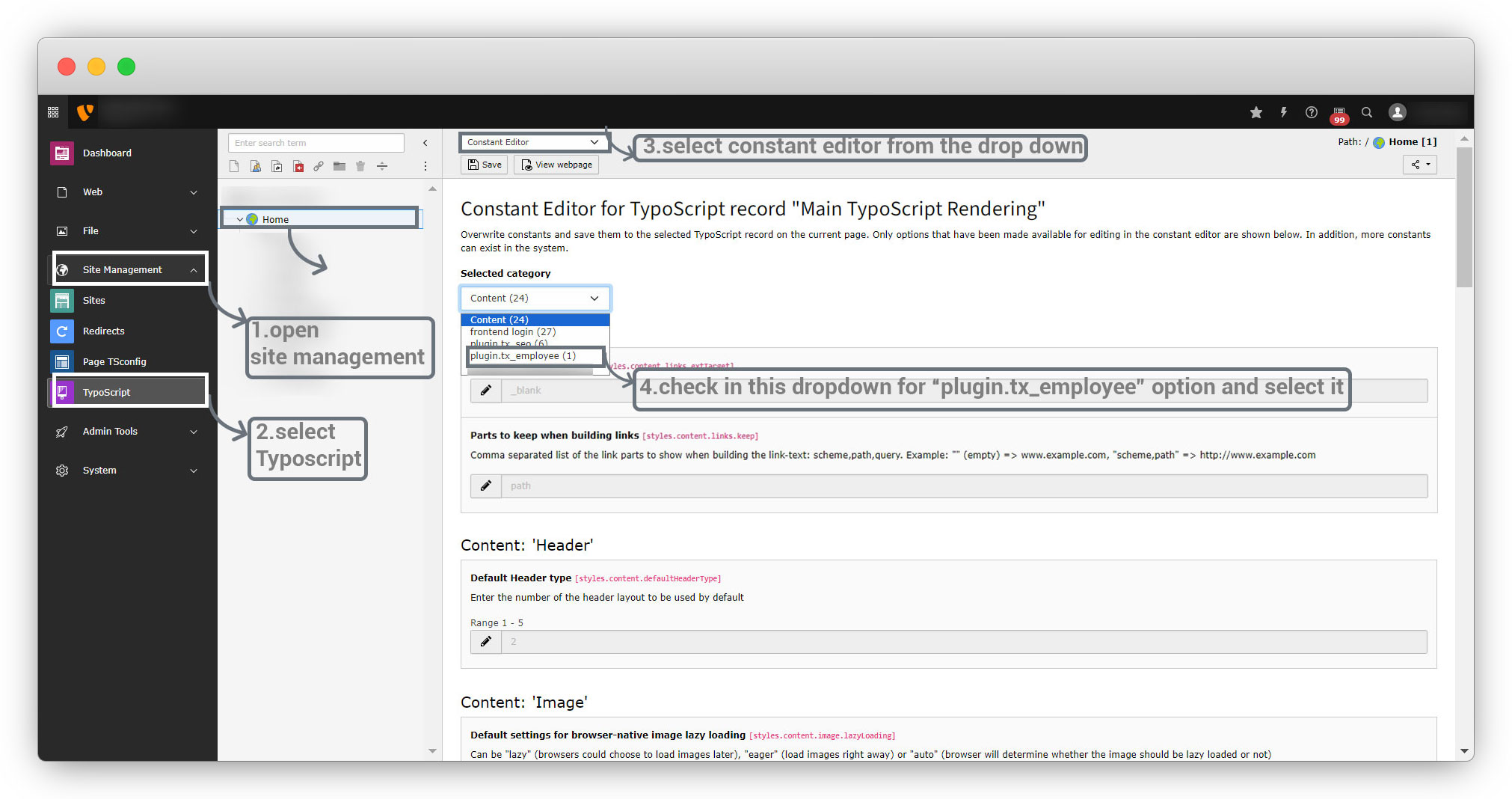
After selecting the “plugin.tx_employee” option, you will see the below screen, and will get an option to add the ID of the page or folder you want to fetch the records from.
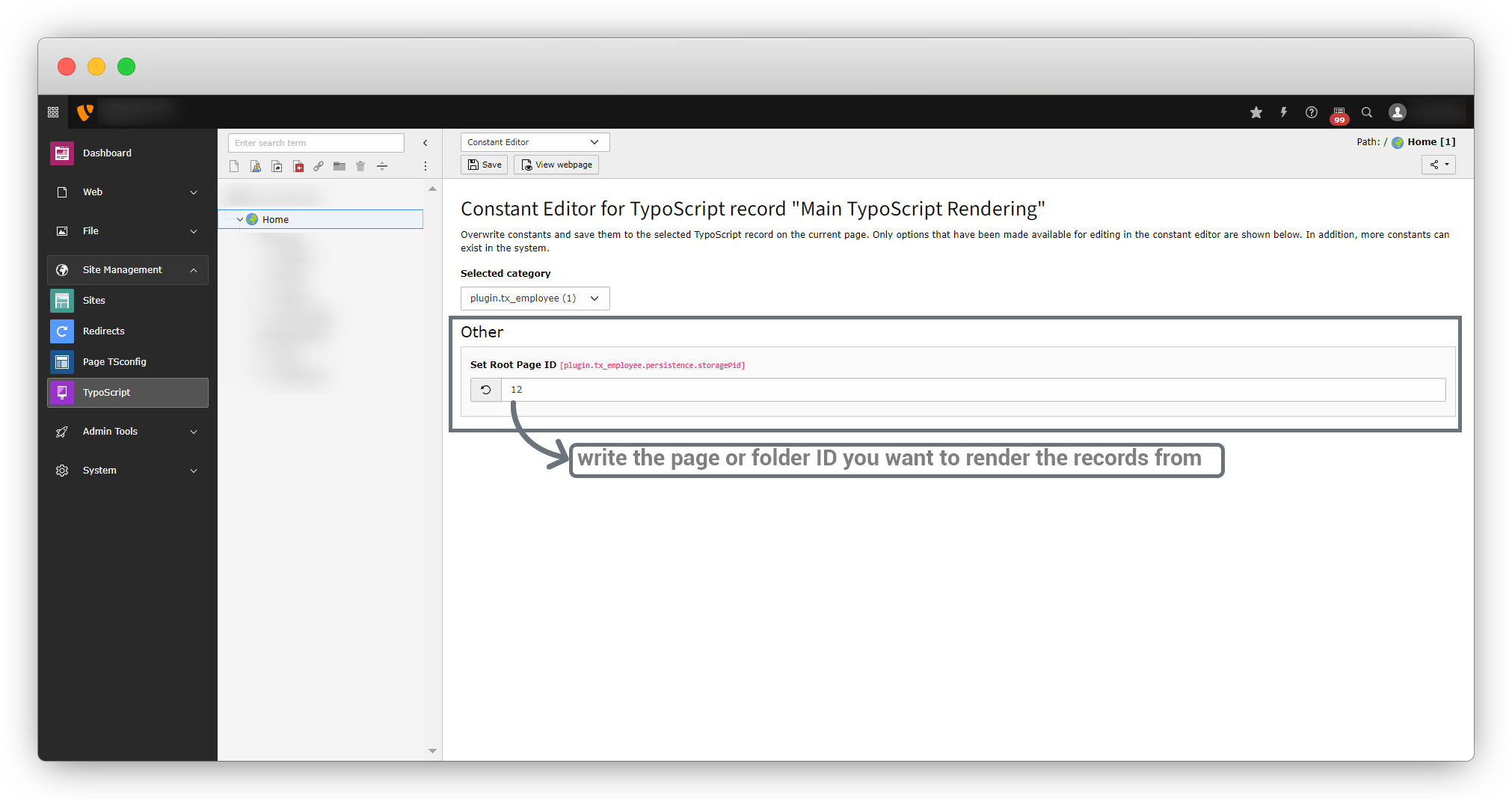
5.3. Now write the below code in setup.typoscript to bind the records in front-end.
plugin.tx_employee{
    persistence {
        storagePid = {$plugin.tx_employee.persistence.storagePid}
    }
}
6. Let’s do templating and render the records with only the required information in the front-end.
7. Here in this example of the “employee” extension, the indexAction() of the EmployController.php has been used, so the template that should be altered is the template of the EmployController.php’s indexAction.
8. Create the template file, and the file path is:<extension_directory>ResourcesPrivateTemplates<folder_name_derived_from_the_controller_name_without_controller_suffix>Index.html
Below is the template file code: file path is employeeResourcesPrivateTemplatesEmployIndex.html
<div>
    <div>
        <div>
            <f:for each="{employs}" as="emp">
                    <div>
                            <div>
                                <f:if condition="{emp.image}">
                                    <f:for each="{emp.image}" as="img">
                                        <f:image image="{img}" alt="{emp.firstName}" width="200c" height="200c" />
                                    </f:for>
                                </f:if>
                            </div>
                        <div>
                            <div>
                                <p><strong>Name : </strong>{emp.firstName} {emp.lastName}</p>
                            </div>
                            <div>
                                <p><strong>Gender : </strong>{emp.gender == 1 ? "Male" :"Female"}</p>
                            </div>
                            <div>
                                <p><strong></strong>{emp.bio}</p>
                            </div>
                        </div>
                    </div>
            </f:for>
        </div>
    </div>
</div>
After altering the template file and adding some dummy data, flush the cache and refresh the front-end page and you will see the output in the below screenshot.
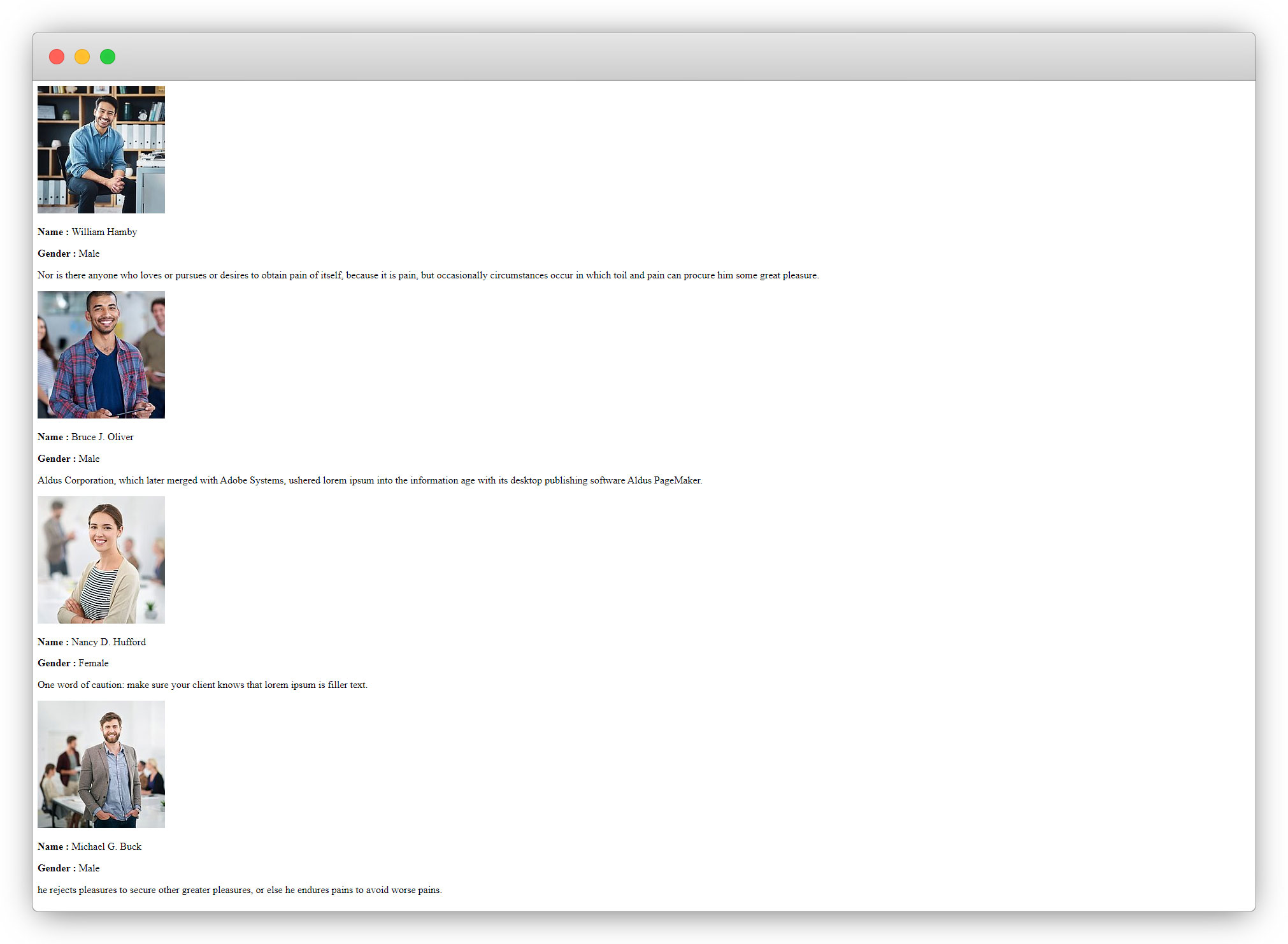
Here the dummy content and the dummy image have been used to just show the example. This is just a listing of the data we are getting that we stored in the TYPO3 admin panel. The design is required for the employee list.
Let’s add some style to the page.
Add CSS & JS into the extension
1. We can use Bootstrap for some basic styles. ( You can find bootstrap CSS and js files from here – getbootstrap.com/docs/5.3/getting-started/download/ )
2. Take the CSS and JS files from bootstrap and upload the bootstrap.min.css file to the employee/Resources/Public/css folder and upload the bootstrap.min.js file to the employee/Resources/Public/js folder.
3. To include the CSS/JS files specifically in TYPO3, write a typoscript.
4. We already have a typoscript file here and that is employee/Configuration/TypoScript/setup.typoscript
5. Write the code as seen in the screenshot below
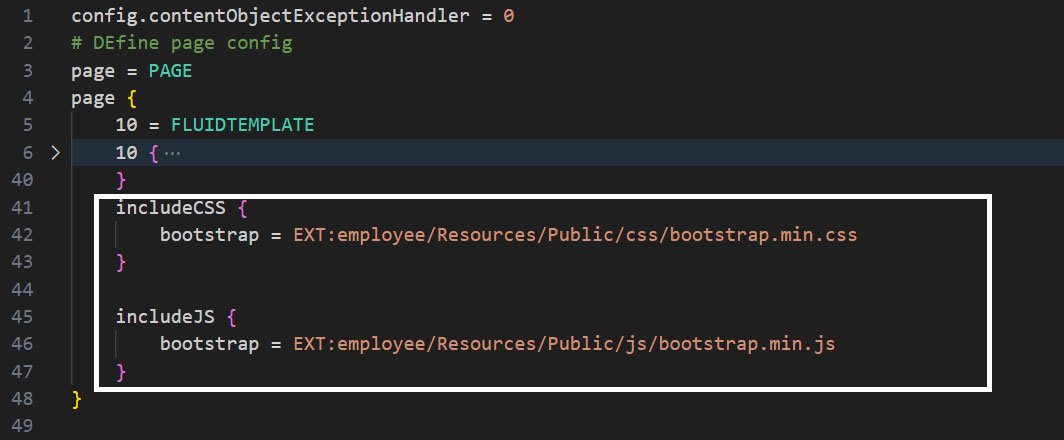
Below is the final code of the setup.typoscript file after including the CSS and JS files as above screenshot
config.contentObjectExceptionHandler = 0
# DEfine page config
page = PAGE
page {
    10 = FLUIDTEMPLATE
    10 {
        templateName = TEXT
        templateName {
            cObject = TEXT
            cObject {
                data = pagelayout
                required = 1
                case = uppercamelcase
                split {
                    token = pagets__
                    cObjNum = 1
                    1.current = 1
                }
            }
            ifEmpty = Default
        }
        templateRootPaths {
            0 = EXT:employee/Resources/Private/Templates/Page/
            1 = {$page.fluidtemplate.templateRootPath}
        }
        partialRootPaths {
            0 = EXT:employee/Resources/Private/Partials/Page/
            1 = {$page.fluidtemplate.partialRootPath}
        }
        layoutRootPaths {
            0 = EXT:employee/Resources/Private/Layouts/Page/
            1 = {$page.fluidtemplate.layoutRootPath}
        }
        dataProcessing {
            10 = TYPO3CMSFrontendDataProcessingFilesProcessor
            10 {
                references.fieldName = media
            }
        }
    }
    includeCSS {
		bootstrap = EXT:employee/Resources/Public/css/bootstrap.min.css
        owl = EXT:employee/Resources/Public/css/owl.carousel.min.css
        custom = EXT:employee/Resources/Public/css/custom.css
	}

	includeJS {
        jquery = EXT:employee/Resources/Public/js/jquery-3.7.1.min.js
        owl = EXT:employee/Resources/Public/js/owl.carousel.min.js
        bootstrap = EXT:employee/Resources/Public/js/bootstrap.min.js
        custom = EXT:employee/Resources/Public/js/custom.js
    }
}


lib.dynamicContent = COA
lib.dynamicContent {
    5 = LOAD_REGISTER
    5 {
        colPos.cObject = TEXT
        colPos.cObject {
            field = colPos
            ifEmpty.cObject = TEXT
            ifEmpty.cObject {
                value.current = 1
                ifEmpty = 0
            }
        }
        pageUid.cObject = TEXT
        pageUid.cObject {
            field = pageUid
            ifEmpty.data = TSFE:id
        }
        contentFromPid.cObject = TEXT
        contentFromPid.cObject {
            data = DB:pages:{register:pageUid}:content_from_pid
            data.insertData = 1
        }
        wrap.cObject = TEXT
        wrap.cObject {
            field = wrap
        }
    }
    20 = CONTENT
    20 {
        table = tt_content
        select {
            includeRecordsWithoutDefaultTranslation = 1
            orderBy = sorting
            where = {#colPos}={register:colPos}
            where.insertData = 1
            pidInList.data = register:pageUid
            pidInList.override.data = register:contentFromPid
        }
        stdWrap {
            dataWrap = {register:wrap}
            required = 1
        }
    }
    90 = RESTORE_REGISTER
}


// plugin.employee_employlist{
//     persistence {
//         storagePid = {$plugin.employee_employlist.persistence.storagePid}
//     }
// }

// plugin.employee_jobdetail{
//     persistence {
//         storagePid = {$plugin.employee_jobdetail.persistence.storagePid}
//     }
// }

plugin.tx_employee{
    persistence {
        storagePid = {$plugin.tx_employee.persistence.storagePid}
    }
}
module.tx_employee {
    persistence {
        storagePid = {$module.tx_employee.persistence.storagePid}
    }
    view {
        templateRootPaths.0 = EXT:employee/Resources/Private/Backend/Templates/
        templateRootPaths.1 = {$module.tx_employee.view.templateRootPath}
        partialRootPaths.0 = EXT:employee/Resources/Private/Backend/Partials/
        partialRootPaths.1 = {$module.tx_employee.view.partialRootPath}
        layoutRootPaths.0 = EXT:employee/Resources/Private/Backend/Layouts/
        layoutRootPaths.1 = {$module.tx_employee.view.layoutRootPath}
    }
}
After including the CSS and JS files, flush the cache and reload the front-end page and the style from Bootstrap will be loaded as you can see in the screenshot below.
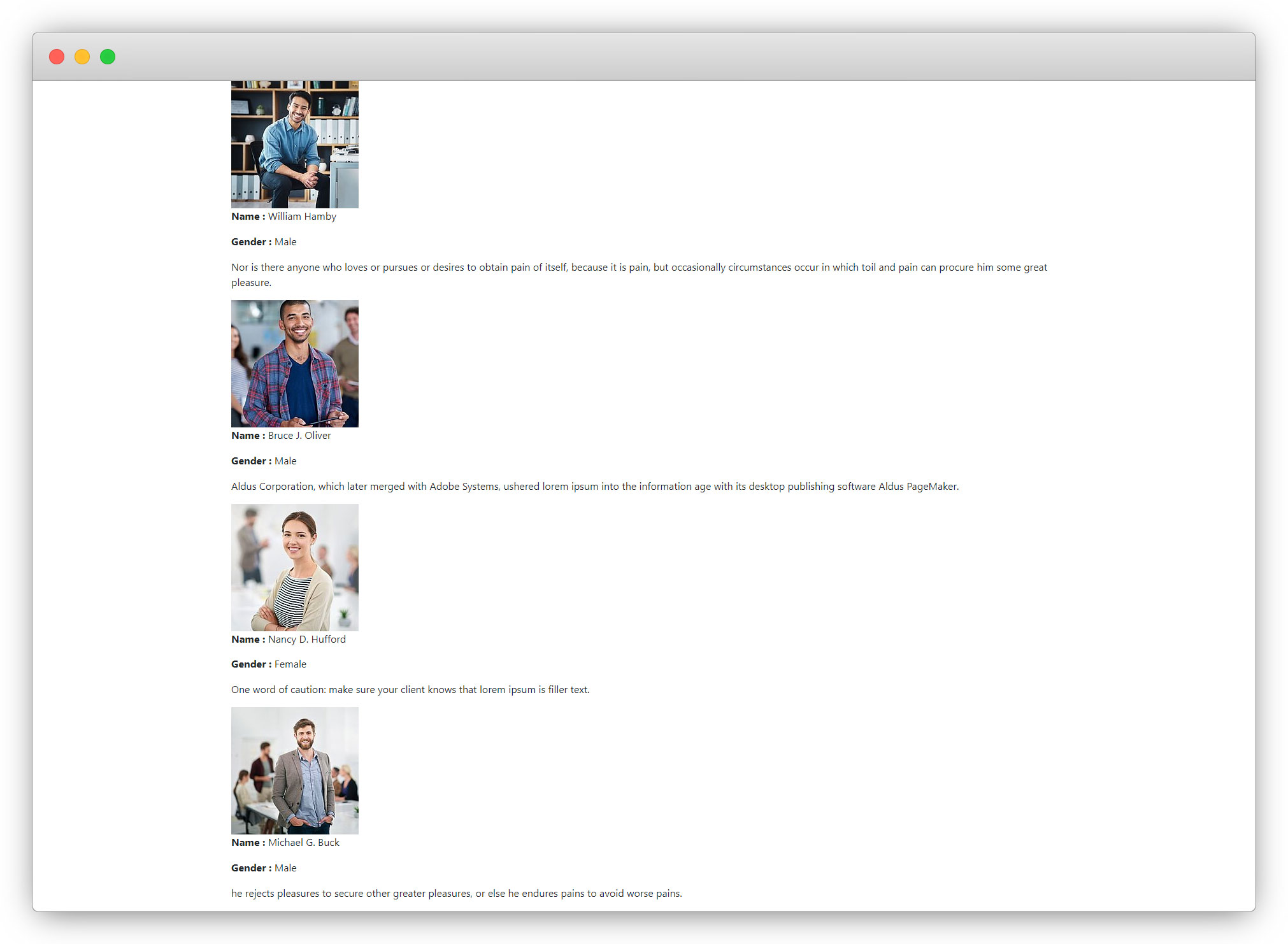
Here the employee list needs some more modification to its look and feel, let’s implement a slider of employees with some style.
1. To implement the slider, we have the option to use the owl carousel – https://owlcarousel2.github.io/OwlCarousel2/ , you can download owl.carousel.min.css and owl.carousel.min.js files from the given URL.
2. Now upload these bootstrap files to the corresponding folders of CSS and JS to the path employeeResourcesPublic
3. Now include them in the setup.typoscript file as we included the bootstrap files.
4. Then create a JS file to write custom JS code. Let’s create a custom.js file here (you can name the file anything you want) to the path employeeResourcesPublicjs
5. Write the JS code given below by using the owl carousel in the employeeResourcesPublicjscustom.js file
$(document).ready(function(){
    var employee_list = $('.employee_list_section .employee_list');
    employee_list.owlCarousel({
        responsiveClass: true,
        dots: false,
        nav:true,
        responsive: {
            0: {
                items: 1,
                nav: true,
            },
            578: {
                items: 1,
                nav: true,
            },
            768: {
                items: 2,
                nav: true,
            },
            992: {
                items: 3,
                nav: true,
            },
            1200: {
                items: 3,
                nav: true,
            }
        },

    });
});
6. Now upload the jQuery (you can download it from here – https://jquery.com/download/) to the employeeResourcesPublicjs folder and include it in the setup.typoscript.
7. Now create a CSS file to write custom CSS code, let’s create a custom.css file, and include it in setup.typoscript file. Below is the code of custom.css file (employeeResourcesPubliccsscustom.css)
.employee_list_section .employee .row {
  display: flex;
  flex-direction: column;
  width: auto;
}
.employee_list_section .employee_list {
  display: flex;
  overflow: hidden;
}
.employee_list .owl-stage {
  display: flex;
}
.employee_list .owl-item {
  padding: 15px;
  background: #fff;
  box-shadow: 0 0pc 50px 0 rgba(2, 2, 48, 0.06);
  margin: 45px;
}
.employee_list_section .emp_img img {
  width: 100%;
  height: auto;
  object-fit: cover;
}
.employee_list_section .emp_img {
  margin-bottom: 20px;
}
.emp_bio {
  min-height: 135px;
}
.employee_list {
  position: relative;
}
.employee_list .owl-prev,
.employee_list .owl-next {
  border: 1px solid gray;
  border-radius: 100%;
  padding: 0 16px;
  background: transparent;
}
.employee_list .owl-prev span,
.employee_list .owl-next span {
  font-size: 30px;
}
.employee_list .owl-prev {
  position: absolute;
  left: 0;
  top: 50%;
}
.employee_list .owl-next {
  position: absolute;
  right: 0;
  top: 50%;
}
8. Included all the CSS and JS files in setup.typoscript file, and the code is below
includeCSS {
	bootstrap = EXT:employee/Resources/Public/css/bootstrap.min.css
        owl = EXT:employee/Resources/Public/css/owlowl.carousel.min.css
        custom = EXT:employee/Resources/Public/css/custom.css
	}

	includeJS {
        jquery = EXT:employee/Resources/Public/js/jquery-3.7.1.min.js
        bootstrap = EXT:employee/Resources/Public/js/bootstrap.min.js
        owl = EXT:employee/Resources/Public/js/owl.carousel.min.js
        custom = EXT:employee/Resources/Public/js/custom.js
    }
9. Now flush the cache and reload the front-end and you will see a working slider of employee’s data,

Share



