



URL copied to clipboard

Create new employees in the back-end module
3 views
__readtime__ Min
read
1. Let’s add the option to create a new employee into the template file: employeeResourcesPrivateBackendTemplatesEmployBelist.html
2. Add the code below to the template file just above the tab
<div>
    <f:link.action action="new">Add New Employee</f:link.action>
</div>
After adding the above code, flush the cache and reload the admin panel, go to the back-end module “Employees” and you will find the button “Add New Employee” on the screen.
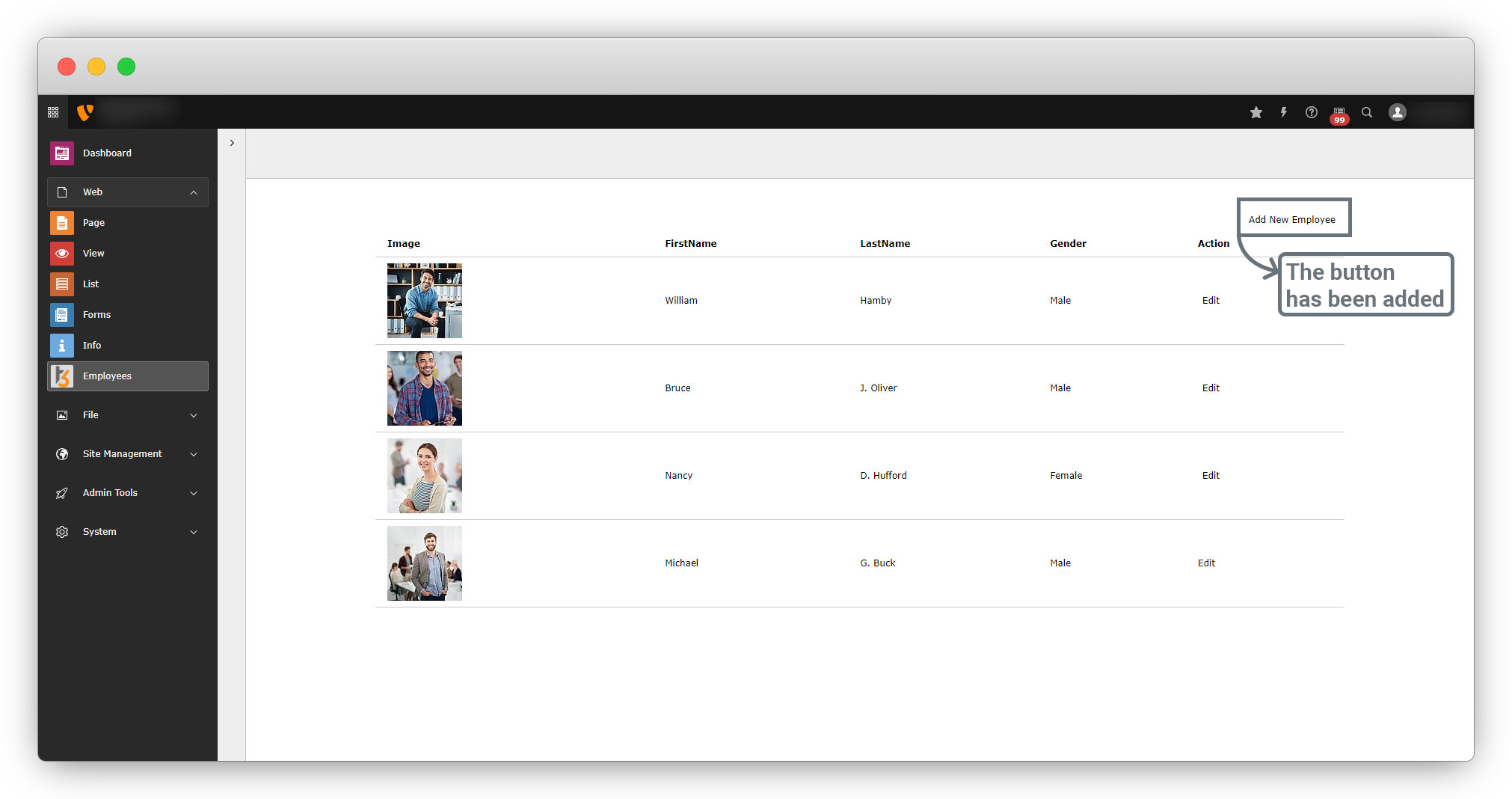
3. But the action “New” is yet not created, so the Add New Employee button will not work. Let’s create an action “New” in the EmployController.php file. (employeeClassesControllerEmployController.php).
4. Add the below code in EmployController.php to create the “New” action.
public function newAction(): ResponseInterface
    {
        $newEmploy = new Employ();
        // this 'newEmploy' variable will pass as an object to the template file
        $this->view->assign('newEmploy', $newEmploy);
        $moduleTemplate = $this->moduleTemplateFactory->create($this->request)->setTitle("Add Employee");
        $moduleTemplate->setContent($this->view->render());
        return $this->htmlResponse($moduleTemplate->renderContent());
    }
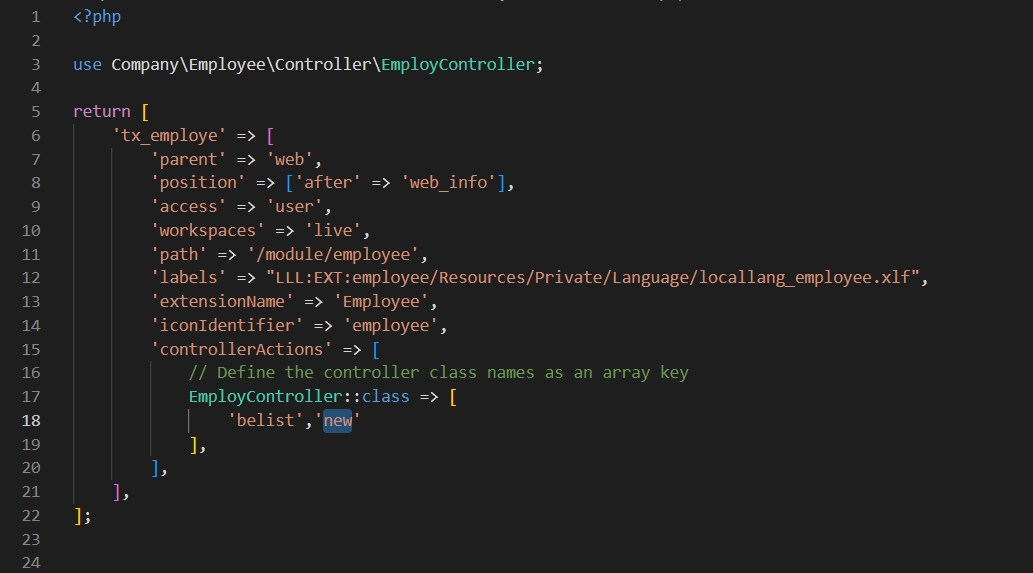
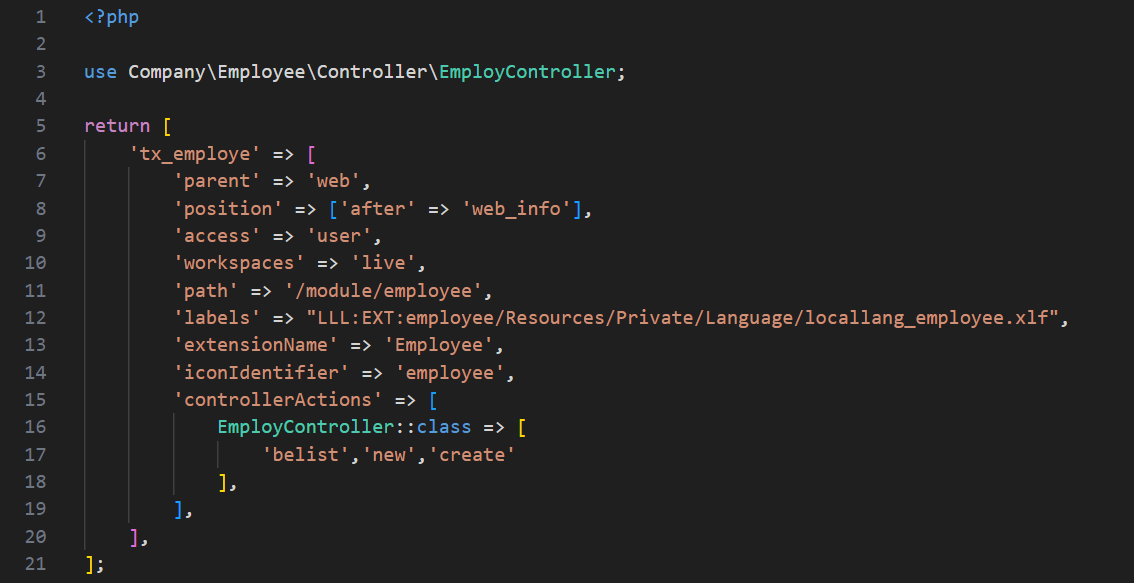
5. Now add the newAction() in employeeConfigurationBackendModules.php file as a new value of the array EmployController to allow the action or make it available for the back-end module as you can see in the screenshot below
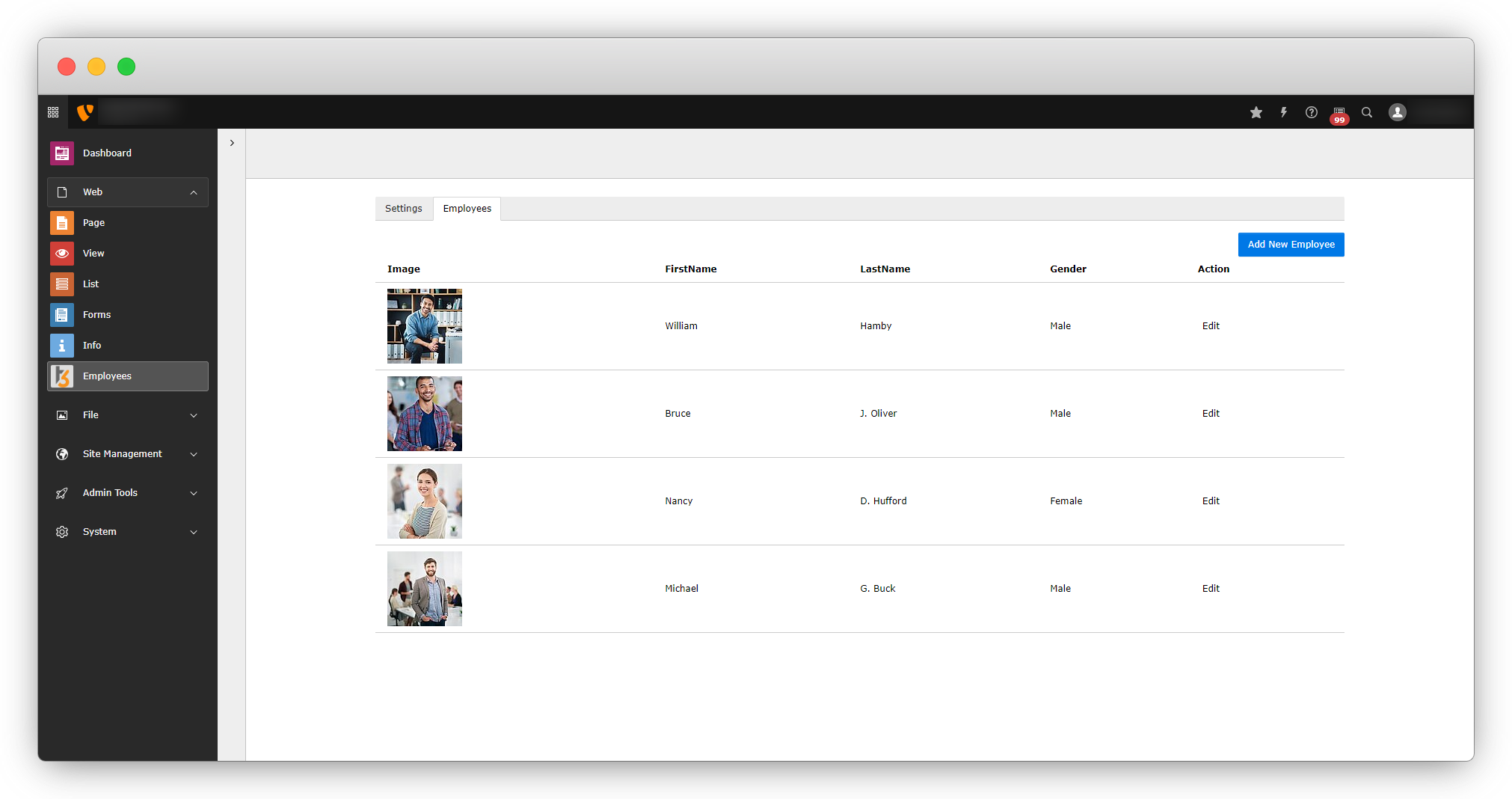
6. After adding the action new, flush the cache and go to the back-end module and you will see the “Add New Employee” button is linked now.
7. Click on the button “Add New Employee” and you will see an error as seen in the screenshot below
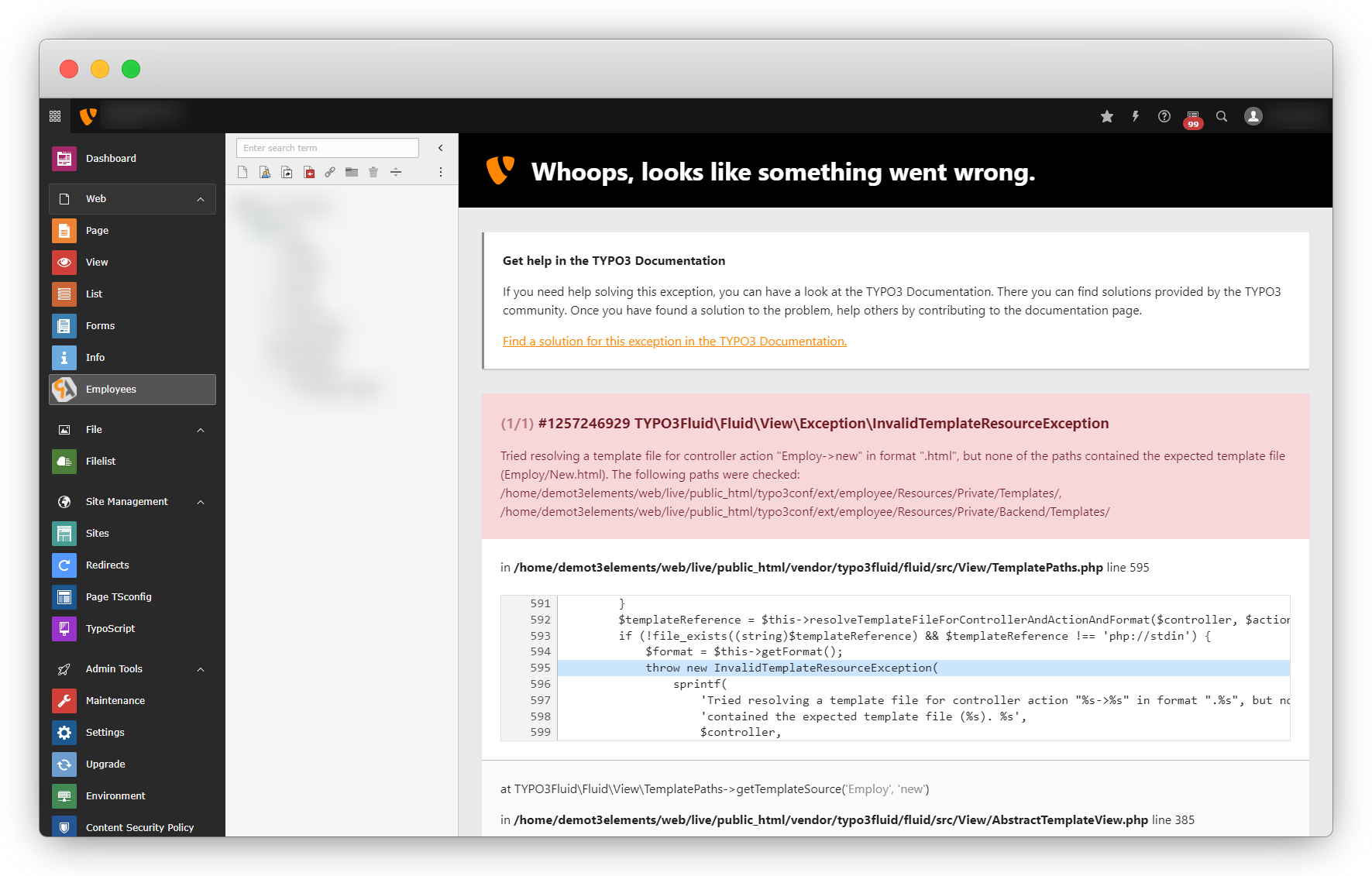
8. The above error indicates that the template file is missing to add the new employee. Let’s create the template file for the action new, and the file path will be: employeeResourcesPrivateBackendTemplatesEmployNew.html
9. Create the file New.html on the given path and add the code below to that file
<html xmlns:f="http://typo3.org/ns/TYPO3/CMS/Fluid/ViewHelpers"
    xmlns:core="http://typo3.org/ns/TYPO3/CMS/Core/ViewHelpers"
    xmlns:be="http://typo3.org/ns/TYPO3/CMS/Backend/ViewHelpers" data-namespace-typo3-fluid="true">
<f:layout name="Default" />
<f:section name="Content">
    <div>
        <div>
            <f:flashMessages />
            <div>
                <h1>New Employ</h1>
            </div>
            <div>
                <f:form action="create" enctype="multipart/form-data" name="newEmploy" object="{newEmploy}"> <!-- pass the variable of model instance from                           controller as an object here -->
                  <f:render partial="Employe/FormFields" arguments="{_all}" />
                    <div>
                        <f:form.submit value="Create New Employee" />
                    </div>
                </f:form>
            </div>
        </div>
</f:section>
</html>
10. In the above code, there is a line of code <f:render partial="Employe/FormFields" arguments="{_all}" />, we are using “partial” to render the form fields.
11. We can put the form fields directly instead of calling the partial, but we are using the partial so we can reuse the form fields.
12. Create the folders and template file of the partial. And the file path will be: employeeResourcesPrivateBackendPartialsEmployeFormFields.html, you can give any name to the partials template file.
<div>
    <div>
        <div>
            <label for="firstName">
                First Name
            </label><br />
            <f:form.textfield property="firstName" placeholder="Enter First Name" required="true"
             />
        </div>
    </div>
    <div>
        <div>
            <label for="lastName">
                Last Name
            </label><br />
            <f:form.textfield property="lastName" placeholder="Enter Last Name" required="true"
             />
        </div>
    </div>
</div>
<div>
    <div>
        <div>
            <label for="salary">
                Salary
            </label><br />
            <f:form.textfield property="salary" placeholder="Enter Salary" type="number" required="true"
             />
        </div>
    </div>
    <div>
        <div>
            <label for="country">
                Country
            </label><br />
            <f:form.select property="country"options="{usa: 'USA', germany: 'Germany', france:'France'}" />
        </div>
    </div>
</div>
<f:comment>
<div>
    <div>
        <div>
            <label for="gender">
                Gender
            </label><br />
            <f:form.radio property="gender" value="{1}" /> Male
            <f:form.radio property="gender" value="{2}" /> FeMale
        </div>
    </div>
    <div>
        <div>
            Languages<br />
            <f:form.checkbox property="languages" value="en" multiple="1" /> English
            <f:form.checkbox property="languages" value="fr" multiple="1" /> French
            <f:form.checkbox property="languages" value="de" multiple="1" /> German
        </div>
    </div>
</div>
</f:comment>
<div>
    <div>
        <div>
            <label for="birthDate">
                Birth Date
            </label><br />
            <f:form.textfield property="birthDate" type="date" required="true" />
        </div>
    </div>
    <div>
        <div>
            <label for="joiningDate">
                Joining Date
            </label><br />
            <f:form.textfield property="joiningDate" type="date" required="true" />
        </div>
    </div>
</div>
<div>
    <div>
        <div>
            <label for="bio">
                Bio
            </label><br />
            <f:form.textarea property="bio" />
        </div>
    </div>
</div>
<div>
    <div>
        <div>
            <label for="experiance">
                Experiance
            </label><br />
            <f:form.textarea property="experiance" />
        </div>
    </div>
</div>
<div>
    <div>
        <div>
            <label for="image">
                Image
            </label><br />
            <f:form.upload property="image" />
        </div>
    </div>
</div>
Here the fluid form has been used in the above code, and you can check more details from the reference link below.
Ref.link: https://docs.typo3.org/other/typo3/view-helper-reference/12.4/en-us/Global/Form/Index.html
13. After adding the above code in partial, now the form will open with the click of “Add New Employee”.
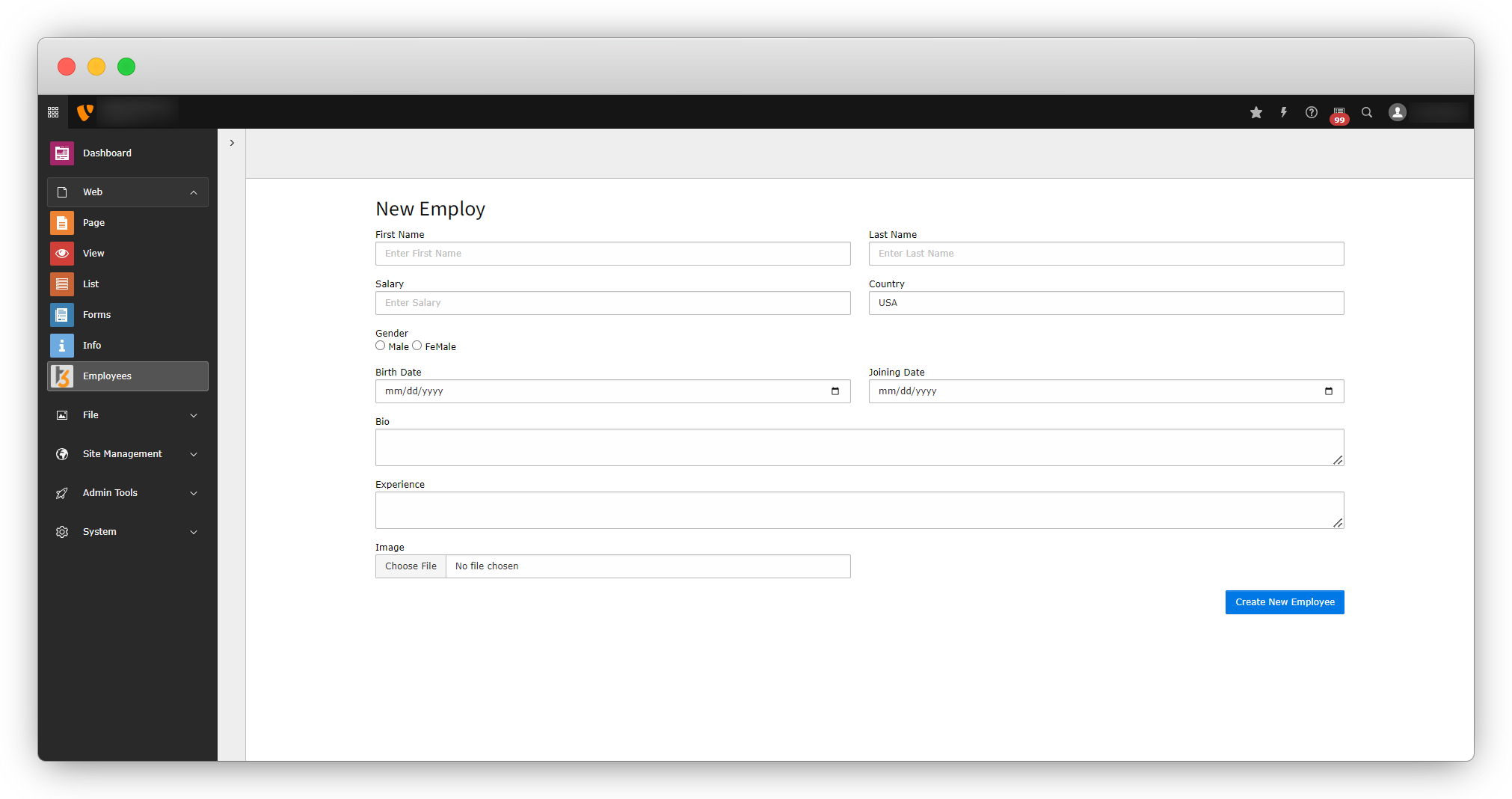
14. After filling out the form when you click on the “Create New Employee” button, nothing will happen. In the New.html file the action “create” has been called which does not exist in the controller, so let’s create the action to submit the form with the click of the button “Create New Employee“.
15. Add the below code in employeeClassesControllerEmployController.php file to create the createAction().
     /**
     * action create
     * @param Employ $newEmploy
     * @return void
     */
    public function createAction(Employ $newEmploy): ResponseInterface
    {
        $this->employRepository->add($newEmploy);
        $this->addFlashMessage('Employee Added successfully!!', 'Success', ContextualFeedbackSeverity::OK, true);
        return $this->redirect('belist');
    }
16. After creating the action, add the action in employeeConfigurationBackendModules.php file to allow it for the backn-end module.
17. After adding the action to the Modules.php file, now fill-up the form and click on “Create New Employee” button and you will see the below screen:
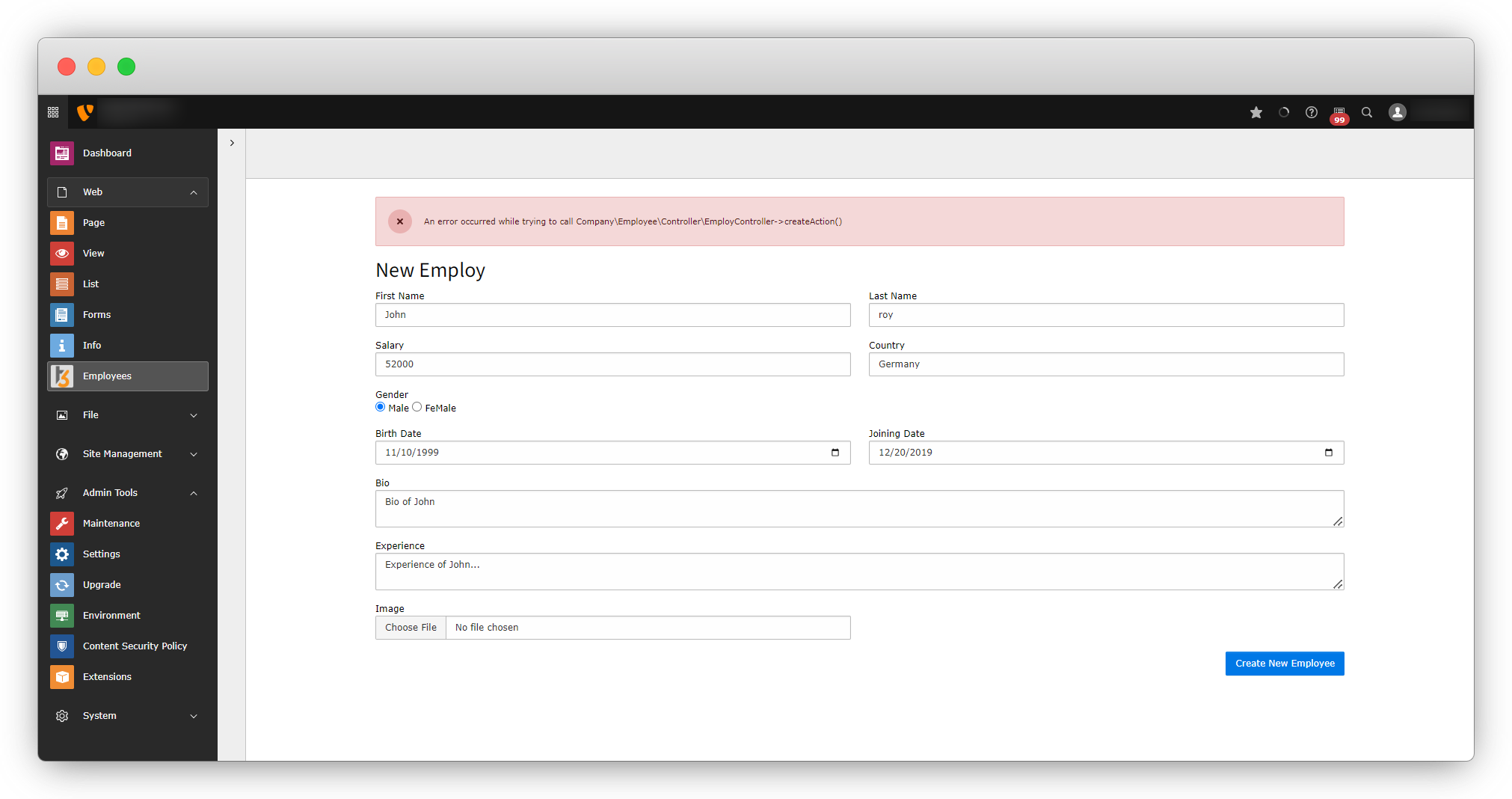
An error occurred for the createAction(), but the error is not indicating anything so it can not be identified, but it might be an error of form validation. Let’s check if it is a form validation error or not.
18. Add the below code in the partial template file: employeeResourcesPrivateBackendPartialsEmployeFormFields.html
<f:form.validationResults>
    <f:if condition="{validationResults.flattenedErrors}">
        <div>
            <f:for each="{validationResults.flattenedErrors}" as="errors" key="propertyPath">
                <div> {propertyPath}
                    <f:for each="{errors}" as="error">
                        <p>{error.code}: {error}</p>
                    </f:for>
                </div>
            </f:for>
        </div>
    </f:if>
</f:form.validationResults>
19. After adding the above code in the partial template file, flush the cache reload the back-end module, fill up the details for an employee, and submit the data by clicking on the “Create New Employee” button and you will see the below screen:
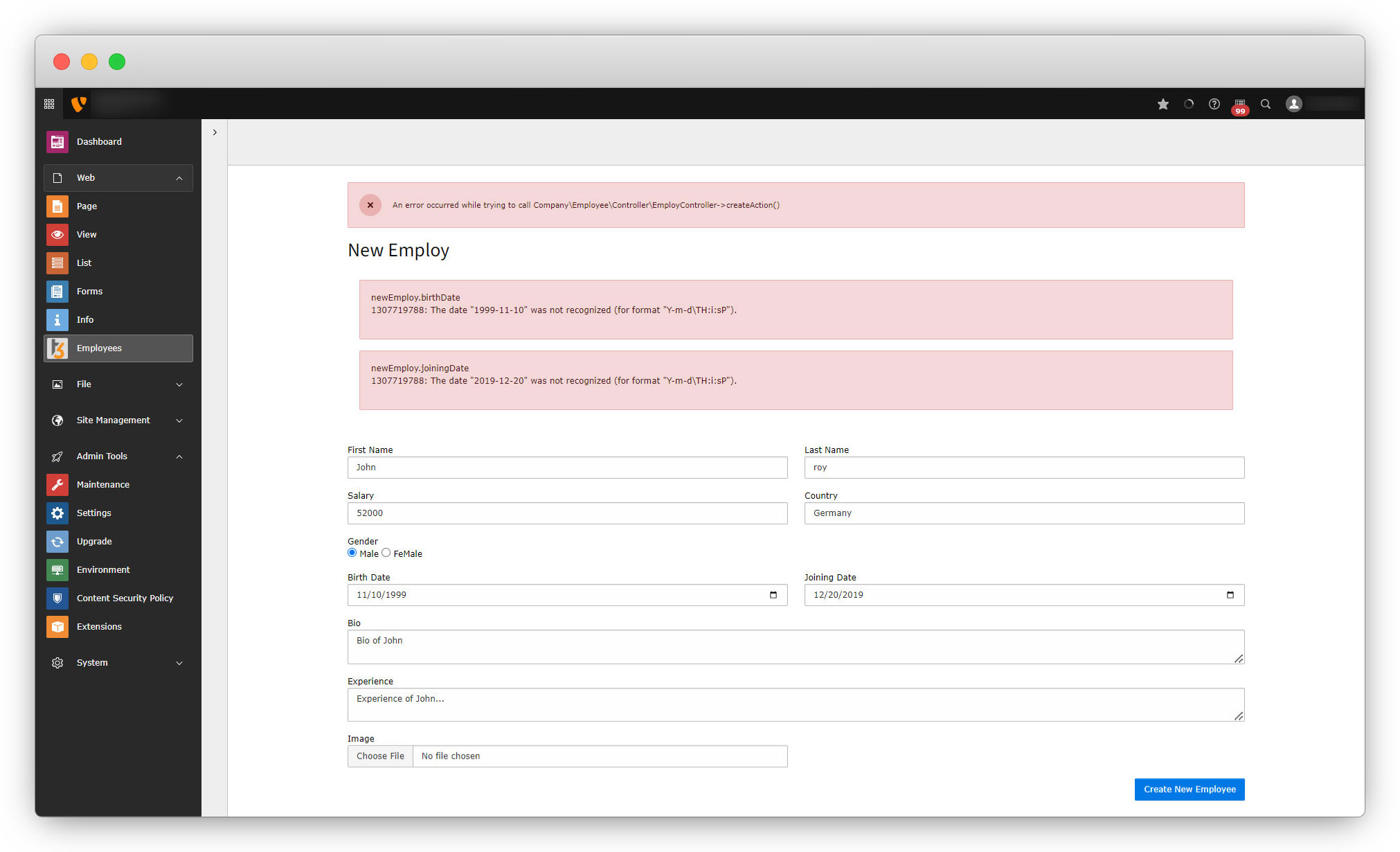
Please note here that we are not uploading the image here, to upload the image we need to convert it into the file reference, and will do that later in this documentation.
20. As you see in the above screenshot, after adding the validation code, an error will appear for the specific fields. This is the error about the datatype conversion as the form is returning the string and the model field needs the date object for those fields. To resolve these errors, it is required to create the initialize action of a createAction() & convert the fields into the datetime datatype add the initialize action just before the create action. Add the initialize action whenever you want to perform anything just before the action calls, for example here we want to convert the data type for “birthdate” and “joiningdate” from string to DateTime so when we call the createAction there should be no error occur, and for that, we have to convert the data type of them before we call the create action, so we should create an initialize action and convert the data type in that action. Add the code below of the initialize action into the file: employeeClassesControllerEmployController.php
public function initializeCreateAction()
    {
        /*
         Here 'newEmploy' which has pass in arguments, is the object that has pass in New.html (employeeResourcesPrivateBackendTemplatesEmployNew.html)
         as an object, and that object is the instance of the model Employ defined in the newAction
        */
        if ($this->arguments['newEmploy']) {
            // Get all the fields of form
            $propertyMappingConfiguration = $this->arguments['newEmploy']->getPropertyMappingConfiguration();
            // Allow a list of specific properties.
            $propertyMappingConfiguration->allowAllProperties();
            // Converting the 'birthDate' to the datatime data type
            $propertyMappingConfiguration->forProperty('birthDate')->setTypeConverterOption(TYPO3CMSExtbasePropertyTypeConverterDateTimeConverter::class, TYPO3CMSExtbasePropertyTypeConverterDateTimeConverter::CONFIGURATION_DATE_FORMAT, 'Y-m-d');
            // Converting the 'birthDate' to the datatime data type
            $propertyMappingConfiguration->forProperty('joiningDate')->setTypeConverterOption(TYPO3CMSExtbasePropertyTypeConverterDateTimeConverter::class, TYPO3CMSExtbasePropertyTypeConverterDateTimeConverter::CONFIGURATION_DATE_FORMAT, 'Y-m-d');
        }
    }
21. After adding the above code, save the file, flush the cache, and fill up the form again and you will see the new employee has been added to the employee list from the backend module.
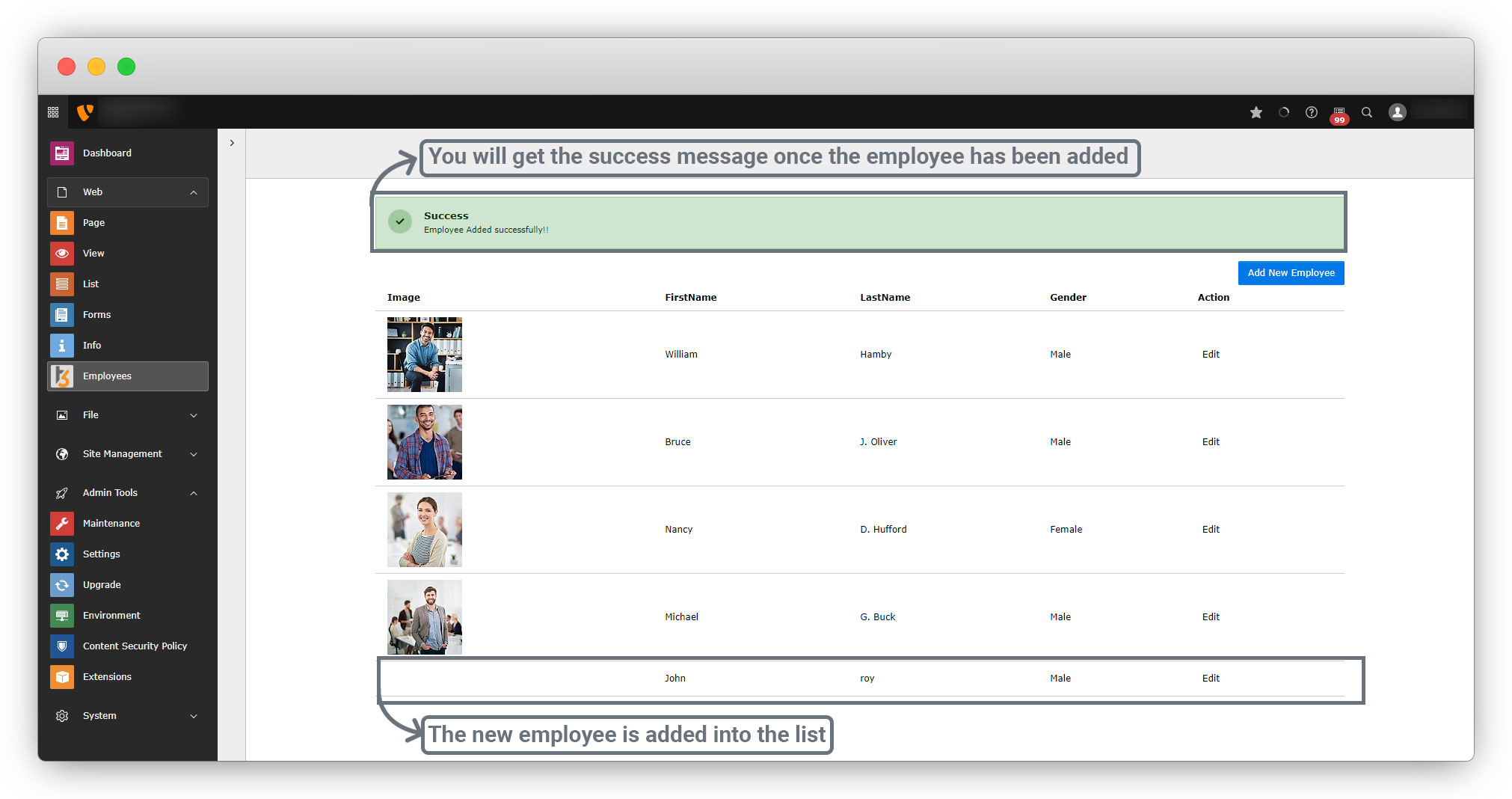
22. In the above screenshot, you can see that we haven’t uploaded the image. The field is already defined in the model file but we need to update the controller, model, and persistence files to make the image field available.
Image field in backend module
Controller updates
1. Below is the final code after some updates related to adding the image in the back-end module and some others:
<?php
declare(strict_types=1);

namespace CompanyEmployeeController;

use DateTime;
use TYPO3CMSExtbaseMvcControllerActionController;
use TYPO3CMSBackendTemplateModuleTemplateFactory;
use PsrHttpMessageResponseInterface;
// use Context which is extending from the Action controller
use TYPO3CMSCoreContextContext;
/**
 *  USE: to debug (syntax: DebuggerUtility::var_dump($var_to_debug); )
 */
use TYPO3CMSExtbaseUtilityDebuggerUtility;
/**
 * USE:
 * All methods in this class are meant to be called statically.
 * So use TYPO3CMSCoreUtilityGeneralUtility::[method-name] to refer to the functions,
 * eg. 'TYPO3CMSCoreUtilityGeneralUtility::milliseconds()'
 */
use TYPO3CMSCoreUtilityGeneralUtility;
/**
 * USE:
 * ContextualFeedbackSeverity will display the error msg according to the status you give like 'OK','WARNING' etc.
 */
use TYPO3CMSCoreTypeContextualFeedbackSeverity;
use CompanyEmployeeDomainModelEmploy;

class EmployController extends ActionController
{
    /**
     * employRepository
     *
     * @var CompanyEmployeeDomainRepositoryEmployRepository
     */
    protected $employRepository = null;
    /**
     * @param CompanyEmployeeDomainRepositoryEmployRepository $employRepository
     */
    public function injectEmployRepository(CompanyEmployeeDomainRepositoryEmployRepository $employRepository)
    {
        $this->employRepository = $employRepository;
    }
    public function __construct(
        protected readonly ModuleTemplateFactory $moduleTemplateFactory,
        Context $context,
    ) {
        $this->context = $context;
    }

    /**
     * action list
     *
     * @return string|object|null|void
     */
    public function indexAction(): ResponseInterface
    {
        $settings = $this->settings;
        $this->view->assign('settings', $settings);
        $employs = $this->employRepository->findAll();
        $this->view->assign('employs', $employs);
        return $this->htmlResponse();
    }


    /**
     * action detail
     *
     * @return string|object|null|void
     */
    public function detailAction(): ResponseInterface
    {
        $uid = GeneralUtility::_GP('uid');
        if ($uid) {
            $details = $this->employRepository->findByUid($uid);
            $this->view->assign('details', $details);
        } else {
            $this->view->assign('details', null);
        }
        return $this->htmlResponse();
    }

    public function belistAction(): ResponseInterface
    {
        $employs = $this->employRepository->findAll();
        $this->view->assign('employs', $employs);
        $moduleTemplate = $this->moduleTemplateFactory->create($this->request)->setTitle("Employee List");
        $moduleTemplate->setContent($this->view->render());
        return $this->htmlResponse($moduleTemplate->renderContent());
    }

    public function newAction(): ResponseInterface
    {
        $newEmploy = new Employ();
        $this->view->assign('newEmploy', $newEmploy);
        $moduleTemplate = $this->moduleTemplateFactory->create($this->request)->setTitle("Add Employee");
        $moduleTemplate->setContent($this->view->render());
        return $this->htmlResponse($moduleTemplate->renderContent());
    }

    public function initializeCreateAction()
    {
        /*
         Here 'newEmploy' which has pass in arguments, is the object that has pass in New.html (employeeResourcesPrivateBackendTemplatesEmployNew.html)
         as an object, and that object is the instance of the model Employ defined in the newAction
        */
        if ($this->arguments['newEmploy']) {
            // Get all the fields of form
            $propertyMappingConfiguration = $this->arguments['newEmploy']->getPropertyMappingConfiguration();
            // Allow a list of specific properties.
            $propertyMappingConfiguration->allowAllProperties();
            // Converting the 'birthDate' to the datatime data type
            $propertyMappingConfiguration->forProperty('birthDate')->setTypeConverterOption(TYPO3CMSExtbasePropertyTypeConverterDateTimeConverter::class, TYPO3CMSExtbasePropertyTypeConverterDateTimeConverter::CONFIGURATION_DATE_FORMAT, 'Y-m-d');
            // Converting the 'birthDate' to the datatime data type
            $propertyMappingConfiguration->forProperty('joiningDate')->setTypeConverterOption(TYPO3CMSExtbasePropertyTypeConverterDateTimeConverter::class, TYPO3CMSExtbasePropertyTypeConverterDateTimeConverter::CONFIGURATION_DATE_FORMAT, 'Y-m-d');
            // Skip the image to be initialize to avoid any error before converting it to the filerference type into the createAction
            $propertyMappingConfiguration->skipProperties('image');
    }
    }
    /**
     * action create
     * @param Employ $newEmploy
     * @return void
     */
    public function createAction(Employ $newEmploy): ResponseInterface
    {
        /**
         * assigning the data type 'FileReference' to the image to make the image available in employee list
         */

        // Getting the uploaded file
        $uploaded = $this->request->getUploadedFiles();
        if (sizeOf($uploaded) > 0) {
            // Store the image into the var $__imag
            $__imag = $uploaded['newEmploy']['image'];
            // Created instance of the ResourceFactory and get the default storage of resource factory
            $resourceFactory = GeneralUtility::makeInstance(TYPO3CMSCoreResourceResourceFactory::class);
            $storage = $resourceFactory->getDefaultStorage();

            /** Add File in storage with below syntax:
             *
             * $newFile = $storage->addFile(
             * "/tmp/temporary_file_name.ext",
             *  $storage->getRootLevelFolder(),
             * "final_file_name.ext",
             * );
             */
            $newFile = $storage->addFile(
                $__imag->getTemporaryFileName(),
                $storage->getRootLevelFolder(),
                $__imag->getClientFilename()
            );

            // Create an instance of the Filereference by using the makeInstance method of GeneralUtility and store it in var $fileReference which
            // haven't any data in it's originalResource
            $fileReference = GeneralUtility::makeInstance(CompanyEmployeeDomainModelFileReference::class);
            // set the data from $newFile to the $fileReference by setOriginalResource method
            $fileReference->setOriginalResource($newFile);
            // add the image to the model instance $newEmploy by using addImage method and pass the $fileReference var. in that method.
            $newEmploy->addImage($fileReference);
        }
        /**
         * If the data has added success fully then this message will appear,
         * and here we have used 'ContextualFeedbackSeverity' with the status 'OK'
         **/
        $this->addFlashMessage('Employee Added successfully!!', 'Success', ContextualFeedbackSeverity::OK, true);
        $this->employRepository->add($newEmploy);
        $redirectPid = (int) $this->settings['listPid'];
        $uriBuilder = $this->uriBuilder;
        $uri = $uriBuilder
            ->setTargetPageUid($redirectPid)
            ->build();
        return $this->redirectToUri($uri);
    }
}
FileReference model override
Create the FileReference.php file to utilize the image in the backend module.
- We are creating the FileReference.php model to override the default model of file reference.
- In the default model of file reference, there is no method like setOriginalResource – https://api.typo3.org/main/classes/TYPO3-CMS-Core-Resource-FileReference.html
- But if we are using extbase, then we have to use the method setOriginalResource, and to add this method in the model file, we are creating the model file to override the default model file for FileReference – https://api.typo3.org/main/classes/TYPO3-CMS-Extbase-Domain-Model-FileReference.html#method_setOriginalResource
- The path of the file is employeeClassesDomainModelFileReference.php. Add the code below to the file
<?php

namespace CompanyEmployeeDomainModel;

use TYPO3CMSCoreResourceResourceInterface;
/**
 * File Reference
 */
class FileReference extends TYPO3CMSExtbaseDomainModelFileReference
{
    public const VIEW_DETAIL_ONLY = 0;
    public const VIEW_LIST_AND_DETAIL = 1;
    public const VIEW_LIST_ONLY = 2;

    /**
     * Obsolete when foreign_selector is supported by ExtBase persistence layer
     *
     * @var int
     */
    protected $uidLocal = 0;

    /**
     * @var string
     */
    protected $title = '';

    /**
     * @var string
     */
    protected $description = '';

    /**
     * @var string
     */
    protected $alternative = '';

    /**
     * @var string
     */
    protected $link = '';

    /**
     * @var int
     */
    protected $showinpreview = 0;

    /**
     * Set File uid
     *
     * @param int $fileUid
     */
    public function setFileUid($fileUid): void
    {
        $this->uidLocal = $fileUid;
    }

    /**
     * Get File UID
     *
     * @return int
     */
    public function getFileUid(): int
    {
        return $this->uidLocal;
    }

    /**
     * Set alternative
     *
     * @param string $alternative
     */
    public function setAlternative($alternative): void
    {
        $this->alternative = $alternative;
    }

    /**
     * Get alternative
     *
     * @return string
     */
    public function getAlternative(): string
    {
        return (string)($this->alternative !== '' ? $this->alternative : $this->getOriginalResource()->getAlternative());
    }

    /**
     * Set description
     *
     * @param string $description
     */
    public function setDescription($description): void
    {
        $this->description = $description;
    }

    /**
     * Get description
     *
     * @return string
     */
    public function getDescription(): string
    {
        return (string)($this->description !== '' ? $this->description : $this->getOriginalResource()->getDescription());
    }

    /**
     * Set link
     *
     * @param string $link
     */
    public function setLink($link): void
    {
        $this->link = $link;
    }

    /**
     * Get link
     *
     * @return mixed
     */
    public function getLink()
    {
        return (string)($this->link !== '' ? $this->link : $this->getOriginalResource()->getLink());
    }

    /**
     * Set title
     *
     * @param string $title
     */
    public function setTitle($title): void
    {
        $this->title = $title;
    }

    /**
     * Get title
     *
     * @return string
     */
    public function getTitle(): string
    {
        return (string)($this->title !== '' ? $this->title : $this->getOriginalResource()->getTitle());
    }

    /**
     * Set showinpreview
     *
     * @param int $showinpreview
     */
    public function setShowinpreview($showinpreview): void
    {
        $this->showinpreview = $showinpreview;
    }

    /**
     * Get showinpreview
     *
     * @return int
     */
    public function getShowinpreview(): int
    {
        return $this->showinpreview;
    }


 // setOriginalResource method is added in this model
   public function setOriginalResource(ResourceInterface $originalResource)
    {
        $this->originalResource = $originalResource;
        $this->uidLocal = (int)$originalResource->getProperty('uid');
    }

}
Persistence
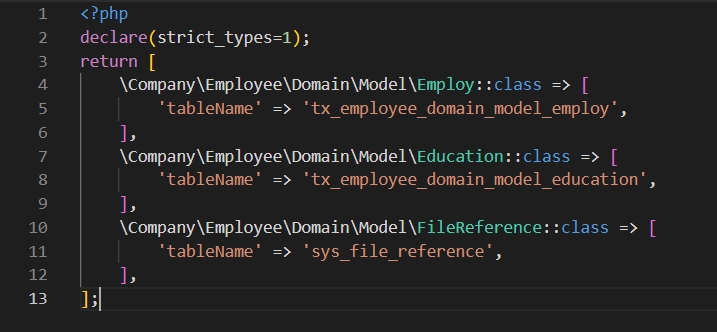
1. Add the below code to the persistence file to establish the connection between the database table (sys_file_reference) and the model FileReference that we created. The file path is: employeeConfigurationExtbasePersistenceClasses.php
CompanyEmployeeDomainModelFileReference::class => [
        'tableName' => 'sys_file_reference',
    ],
Below is the screenshot of the final code of the persistence file after adding the above code.
2. Replace the code for image field with the below code in Employ model. The file path is: employeeClassesDomainModelEmploy.php
public function addImage(FileReference $image): void
    {
        $this->image = $this->getImage();
        $this->image->attach($image);
    }

    /**
     * @return ObjectStorage<FileReference>
     */
    public function getImage(): ObjectStorage
    {
        if ($this->image instanceof LazyLoadingProxy) {
            $this->image->_loadRealInstance();
        }

        if ($this->image instanceof ObjectStorage) {
            return $this->image;
        }

        return $this->image = new ObjectStorage();
    }


    public function removeImage(FileReference $image): void
    {
        $this->image = $this->getImage();
        $this->image->detach($image);
    }

    /**
     * @param ObjectStorage<FileReference> $image
     */
    public function setImage(ObjectStorage $image): void
    {
        $this->image = $image;
    }
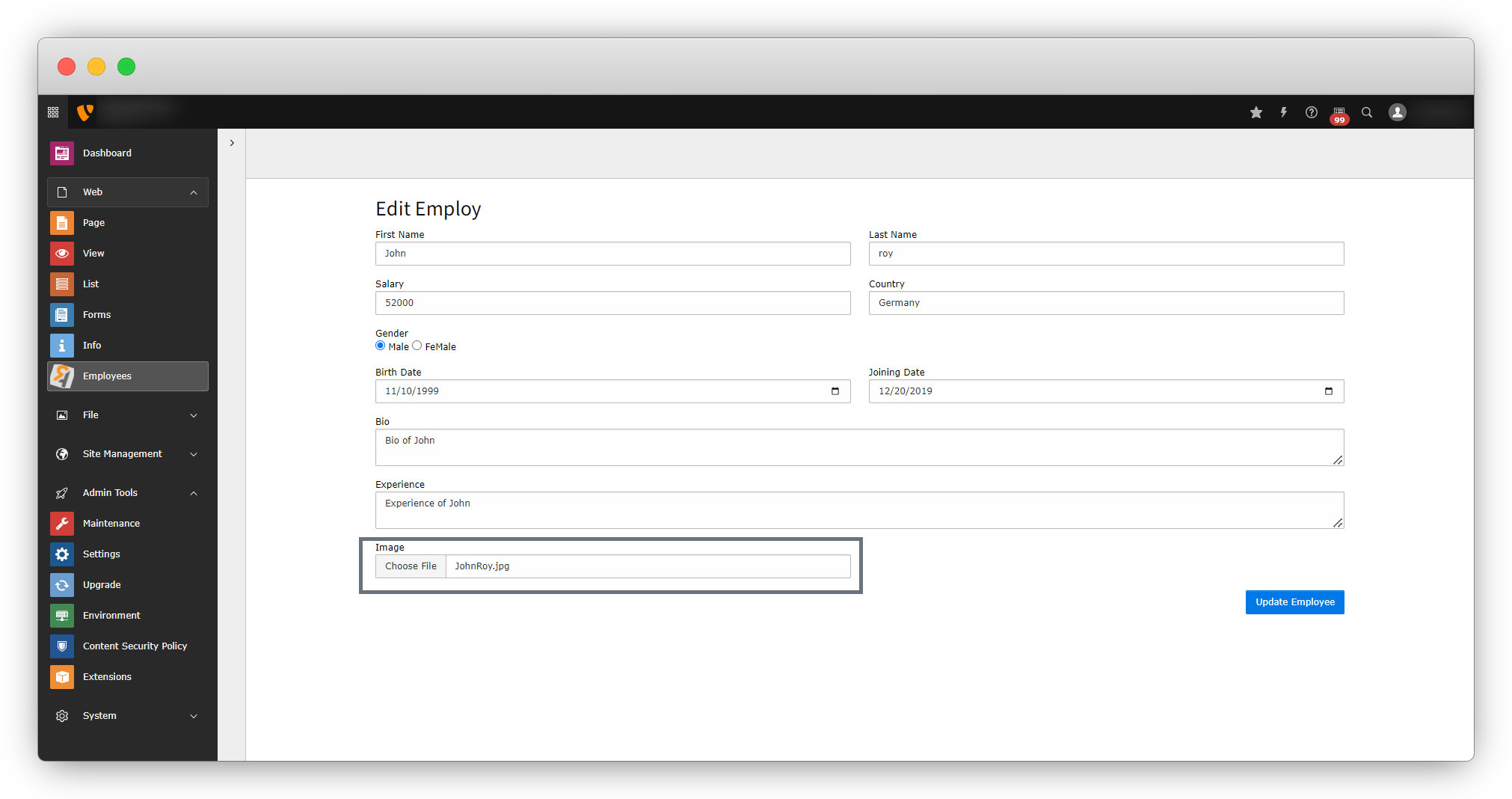
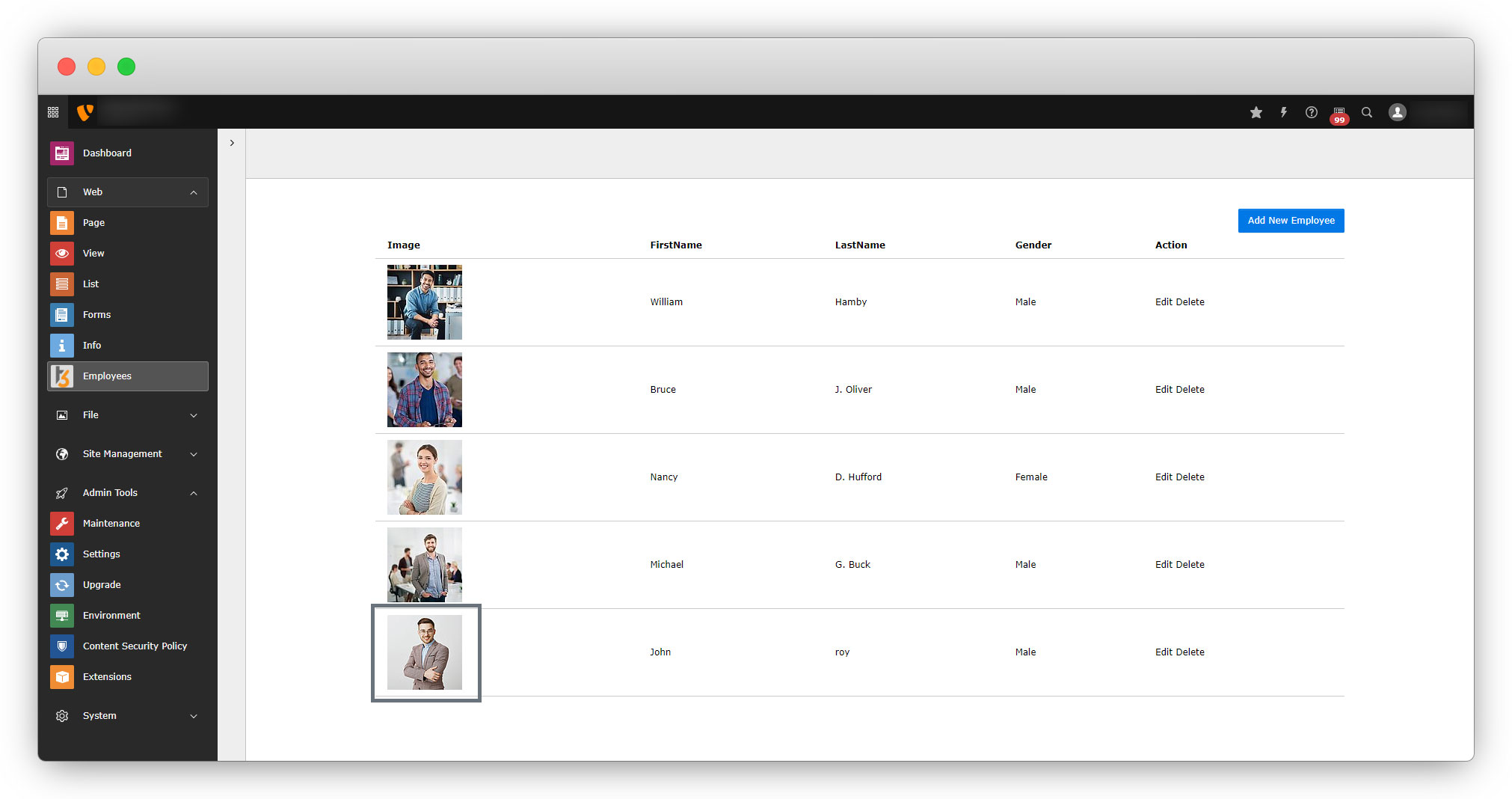
After the above updates in the model file, toggle the extension (Deactivate once and then activate again), or go to Maintainance > Flush TYPO3 and PHP cache and click on the button “Flush cache” and submit the form from the back-end module with an image and you will get the image of the employee in the employee list.
Share



